For groups that aren't all on Apple
Freeform alternatives that work on Windows, Android and the web
Apple Freeform is free and lovely with an Apple Pencil, but it only runs on iPhone, iPad, Mac and Vision Pro. Everyone you share a board with needs an Apple Account, even just to look at it. If someone in your group is on Windows, Android or a Chromebook, here is a Freeform alternative to use instead.
Opens in your browser. Anyone can view; a free sign-in lets you edit.
Updated
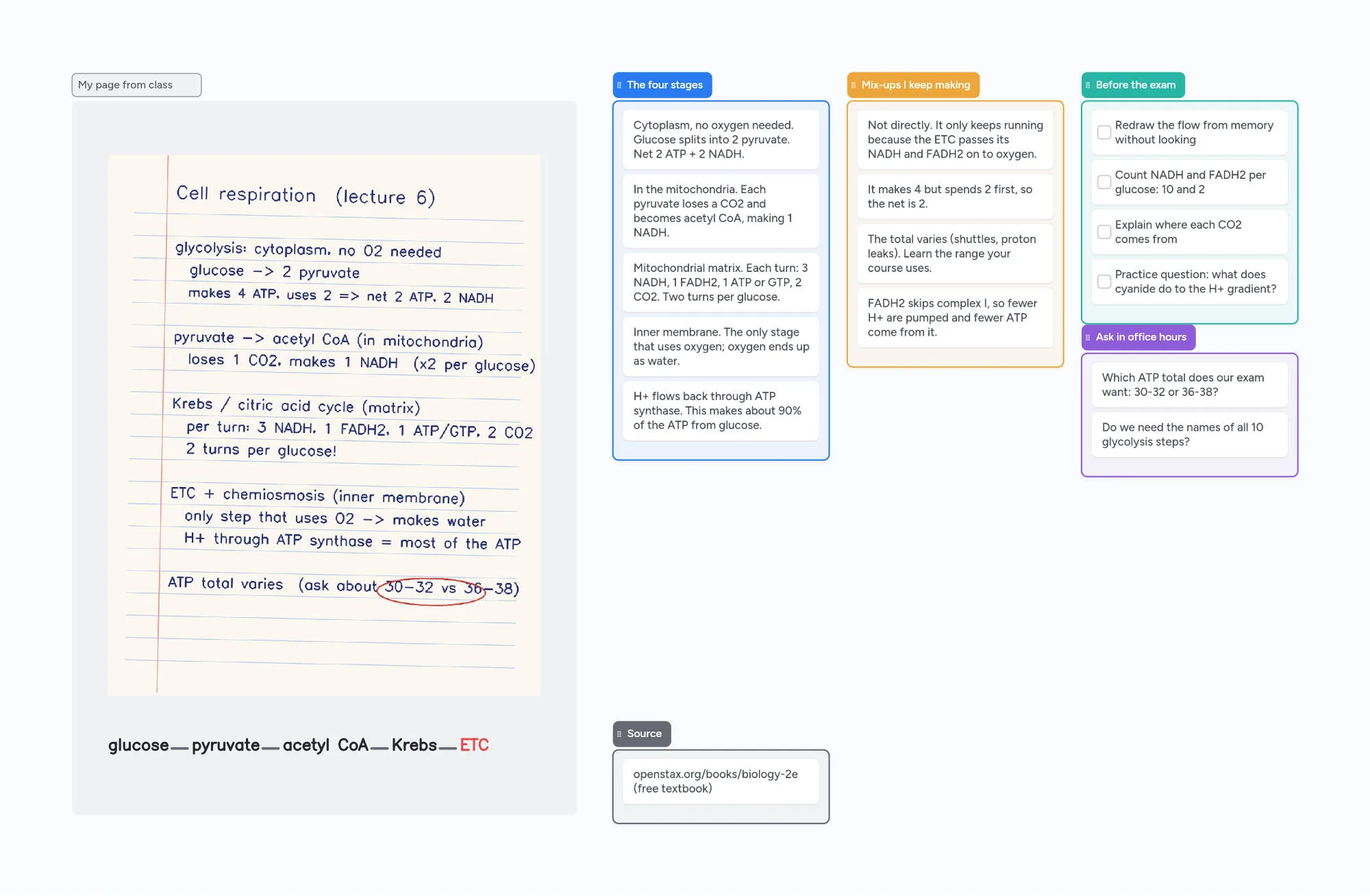
The short answer
- Freeform is for Apple devices only. There's no web version, no Windows or Android app, and it isn't on iCloud.com.
- To view or edit a shared Freeform board, everyone has to be signed in to an Apple Account.
- Instaboard runs in any browser and on iPhone, iPad and Android. Anyone can view by link; editing needs a free sign-in with Google, Apple or email.
Two more ready boards: a lesson and a group plan
Freeform is also a favourite for lessons with an Apple Pencil and for plans with friends. Both of these open in any browser and are yours to edit once you sign in for free.
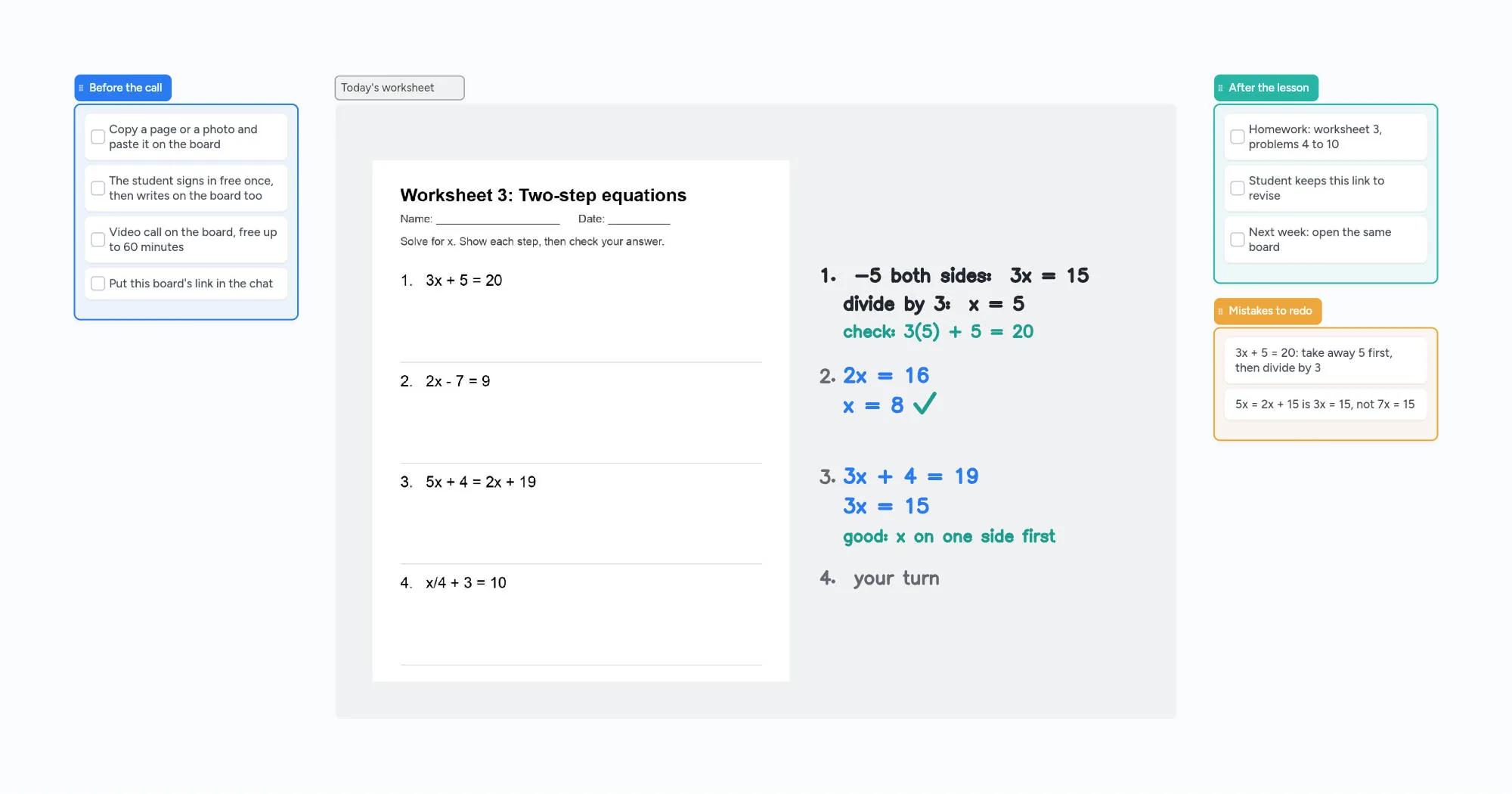
A lesson on a pasted worksheet
The worksheet pasted on the board, the tutor's worked example in ink and the student's answers in blue, with a call checklist. Paste your own worksheet and start the call.
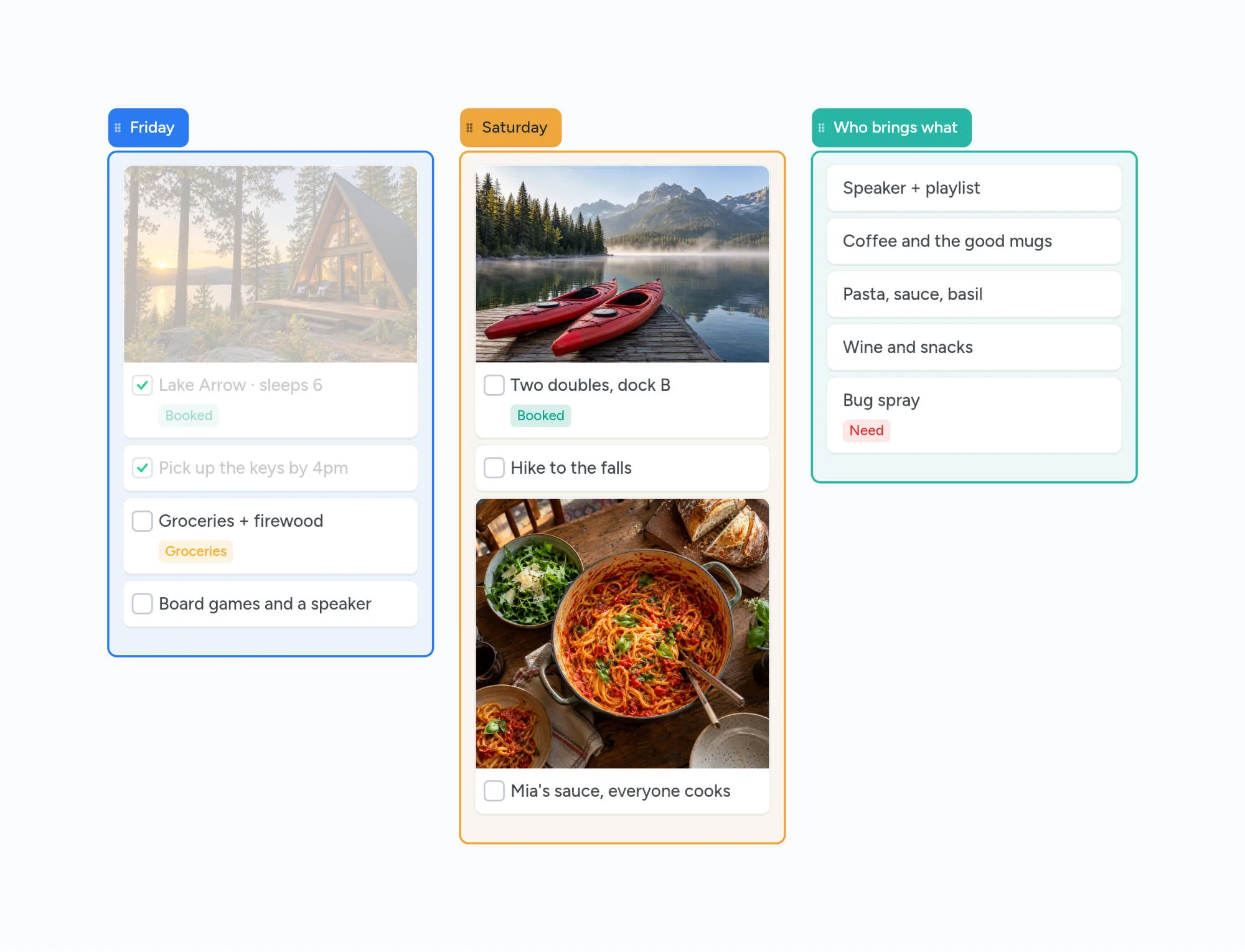
A shared weekend plan
Lists for each day, photos on the cards and who brings what. It opens on any phone or browser, so the whole group can add to it.
The catch with Freeform
Apple's own collaboration guide says: "To edit or view the board, everyone you share with must be signed in to their Apple Account." Full collaboration also needs Freeform turned on in iCloud and two-factor authentication, and the viewing or editing needs iOS 16.2, iPadOS 16.2, macOS 13.1 or later.
That's fine when everyone has an iPhone. It breaks the moment your student has a Chromebook, your sister has an Android phone or your coworker is on Windows.
- Big boards get heavy. iPad users on Reddit report lag, heat and battery drain once a board holds a few pages of handwriting.
- It sketches, but it doesn't plan. There are no tasks, due dates or calendar, and a call hands you off to FaceTime instead of happening on the board.
- Some extras now cost money. Premium content and intelligence features in Freeform come with an Apple Creator Studio subscription ($12.99 a month). The app itself is still free.
Freeform and Instaboard side by side
| Apple Freeform | Instaboard | |
|---|---|---|
| Price | Free; Creator Studio extras $12.99 a month | Free plan; Pro $5 a month billed yearly |
| Free limits | No board or item limits; boards use the owner's iCloud storage | 5 boards, 150 cards and items (pen strokes don't count), 3 images and 1 file per board |
| Works on | iPhone, iPad, Mac, Vision Pro | Any browser (Windows, Mac, Chromebook), iPhone, iPad, Android |
| View a shared board | Apple Account required | No account needed |
| Edit a shared board | Apple Account, iCloud and two-factor authentication | Free sign-in with Google, Apple or email |
| Join by code | No | 4-digit code or QR |
| Apple Pencil | Yes, with many brushes and handwriting tools | Pressure-sensitive pen, highlighter and laser pointer |
| Calls | Hands off to FaceTime | Video call on the board, free up to 1 hour |
| Tasks and dates | No | Checklists, assignees, due dates, calendar lists |
| People per board | Up to 100 | Unlimited |
Swipe the table sideways to see every column.
Freeform facts from Apple Support and the App Store listing, checked October 27, 2026.
Is there a web version of Freeform?
No. Apple's support page "If a Freeform link isn't working" says: "You can open Freeform links on iPhone, iPad, Mac, and Apple Vision Pro." It names no browser. iCloud.com doesn't list Freeform either: Apple's list of apps and features on iCloud.com for a signed-in account has Apple Invites, iCloud Settings, Calendar, Contacts, Find Devices, iCloud Drive, iCloud Mail, Keynote, Notes, Numbers, Pages, Photos and Reminders, plus a few iCloud+ features, and the separate list for web-only accounts has no Freeform (both read November 18, 2026).
So a Windows PC, a Chromebook or an Android phone can't open a Freeform board in a browser. Two things do work. Apple's Export as PDF gives a view-only file anyone can open. For a board people can write on, use one that runs in a browser: Instaboard opens in any browser, anyone with the link can view without an account, and writing takes a free sign-in. Choose Import PDF to turn the exported file into pages you can write on (the PDF is a flat picture, and each imported PDF takes 1 of your 5 free boards). Excalidraw also runs in a browser, and the table below says what Excalidraw, Miro and the others cost. Steps: how to share a Freeform board with Windows or Android.
Where Freeform is the better choice
- It's free with no board or item limits.
- It's already there. Freeform comes with every Apple device and uses the Apple Account you already have.
- Apple's pen tools are excellent: Scribble, the reed pen and Writing Tools for handwriting.
- More kinds of content: Scenes for presenting, tables, 700+ shapes and document scanning.
For sketching on your own, or a household where everyone uses Apple devices, Freeform is hard to beat.
When Instaboard fits better
- Someone in the group isn't on Apple. They open the link in any browser or the Android app.
- You teach or tutor. Start a call on the board, and your student writes on the same page from whatever device they have.
- You're planning, not just sketching: a trip, an event or a move, with who does what and by when.
- The plan gets big. Any card can open into its own board, so the main board stays readable.
Best Freeform alternatives in 2026: which one for which need
We make Instaboard, so it is in this table. There's no ranking: the tools are ordered by the job they suit, and every row says where it beats us. Free-plan facts were read on each tool's own pages on November 13, 2026; the Microsoft Whiteboard, OneNote, Obsidian, Whimsical and Heptabase rows were read on November 18, 2026.
| Tool | Free plan and price | Where it is better than Instaboard | Where Instaboard fits better |
|---|---|---|---|
| Miro | Free: unlimited boards, the three most recent stay editable. Starter $8 a month per member billed yearly, which adds public sharing for others to edit with no sign-in | Docs, Tables, Timelines, Kanban and Slides on the canvas, plus integrations with Microsoft, Slack, Google and Adobe | 5 editable boards on the free plan, and a video call on the board |
| FigJam | Free forever with unlimited collaborators in 3 editable files; paid from $3 per user a month | Open sessions: anyone can join free for 24 hours with no account; hundreds of free templates | 5 editable boards on the free plan, and a video call on the board |
| Excalidraw | Free forever: unlimited collaborators, invite by link, guests free. Plus is $6 a month per user and adds unlimited scenes and folders. The free app saves drawings in your browser's storage | A quick sketch that collaborators join by link | Cards, lists, checklists and due dates next to the drawing, and a call on the board |
| Milanote | Free with no time limit: 100 notes, images or links and 10 file uploads, unlimited shared boards. $9.99 a month per person billed annually ($12.50 monthly) | Pictures: the paid plan has unlimited notes, images and file uploads (we allow 3 images per board) | 150 cards and items on the free plan (pen strokes don't count), and a call on the board |
| Canva Whiteboards | Its page says Whiteboards work on any desktop, web browser or mobile device, with timers, comments and reactions on stickies. Some features are marked Pro | You already design in Canva and want the whiteboard beside your designs | A video call on the board, checklists and due dates |
| AFFiNE | Free: unlimited local workspaces, open source. Its download page says Cloud plans add sync and collaboration; the desktop app has the full Edgeless whiteboard and the iOS and Android apps focus on capture and review | Local files with no account, and an open-source editor | A shared board others open by link, with cards, lists and a call. We read no AFFiNE page that sets out its free sharing limits |
| Concepts | Free: infinite canvas, five layers, unlimited drawings, basic JPG export. Subscription $4.99 a month or $29.99 a year. Its page links the App Store, Play Store and Microsoft Store and says some features are iOS-only while the other platforms catch up | Sketching with a stylus: vector brushes, Copic, HSL and RGB colour wheels, layers | A shared board with cards, lists and a call. We read nothing on Concepts' pages about sharing a board |
| Goodnotes | Free plan described as a basic, limited notes tool; paid plans on its pricing page. Its collaboration page describes real-time work on notebooks, whiteboards and text documents | Handwritten notebooks and PDF annotation | A shared planning board with cards, lists and a call; we have no handwriting recognition or search |
| Microsoft Whiteboard | Microsoft's retirement notice says the standalone apps for Windows, iOS and Android retire on October 16, 2026, for work or school and personal accounts. For work or school accounts it carries on in Teams and on the web. We did not check free-plan terms; Microsoft describes it as a canvas in Microsoft 365 | Meetings in Microsoft Teams, and its product page lists more than 60 free templates, Loop components and Copilot | A board you open from a link in any browser, with cards that have owners and a call on the board |
| OneNote | Runs on Windows, Mac, iPad, iPhone, Android and the web (Microsoft Support). We did not check free-plan limits | Notebooks you search, with digital ink, voice transcription and Copilot (Microsoft's product page) | A free-form board with cards, lists and a call. Microsoft's sharing page says a shared notebook has to be saved in OneDrive or SharePoint and that sharing single pages was removed |
| Obsidian | Free without limits and no sign-up required (its pricing page). Sync, which adds shared vaults, is $4 a month billed annually or $5 billed monthly | Canvas, a core plugin: notes, images, PDFs and web pages laid out on infinite space and joined with lines, saved as open-format .canvas files kept on your device. Apps for iOS, Android, Windows, Mac and Linux | A board others open by link, with a call on it. In Obsidian, collaboration on shared vaults is listed under the paid Sync service |
| Whimsical | Free: 50 board objects and 50 doc blocks a month, a watermark on exports and 7-day version history. Pro is $10 a month per editor. The pricing page lists unlimited guests, and public share links that can view, comment and edit on Free | Unlimited boards on the free plan (we allow 5) | 150 items in total rather than 50 objects a month, and a call on the board. Copy as image added no mark in our November 15 check on the web app |
| Heptabase | The pricing page lists three plans: Pro $8.99 a month, Premium $17.99 and Premium+ $53.99. Pro lists unlimited whiteboards and unlimited collaborator invites | A knowledge base of notes and whiteboards, with PDF highlights and YouTube transcripts | A free plan (5 boards, 150 items) and a call on the board |
| Instaboard (us) | Free: 5 boards, 150 cards and items (pen strokes don't count), 3 images and 1 file per board. Pro $5 a month billed yearly | - | Opens in any browser and in the iPhone, iPad and Android apps; anyone can view by link, writing takes a free sign-in; free calls up to 60 minutes with a warning 10 minutes before the end, not recorded |
Swipe the table sideways to see every column.
From each tool's own pricing, plans and features pages, read November 13, 2026: miro.com/pricing, figma.com/figjam/online-whiteboard, plus.excalidraw.com/pricing and excalidraw.com, milanote.com/plans, canva.com/whiteboards, affine.pro/pricing and /download, concepts.app, goodnotes.com/pricing and /features/collaboration. Microsoft Whiteboard and OneNote rows, read November 18, 2026: support.microsoft.com Whiteboard retirement notice, Microsoft's Whiteboard and OneNote product pages, Microsoft Support's OneNote download and sharing articles. Obsidian, Whimsical and Heptabase rows, read November 18, 2026: obsidian.md/pricing, /help/plugins/canvas and /download, whimsical.com/pricing, heptabase.com/pricing. For Microsoft Whiteboard after the app retirement see [Microsoft Whiteboard alternatives](/compare/microsoft-whiteboard-alternatives).
| If you need | Look at |
|---|---|
| To sketch alone with an Apple Pencil, and everyone you share with is on Apple | Freeform itself |
| A stylus-first sketchbook on iPad, Android or Windows | Concepts |
| Handwritten notes and PDF annotation | Goodnotes |
| Guests to join with no account, for a short session | FigJam open sessions (24 hours); Excalidraw (collaborators join by link) |
| Workshops with docs, tables, timelines and integrations | Miro |
| Boards full of pictures and links | Milanote |
| The whiteboard beside your Canva designs | Canva Whiteboards |
| Local files you control | AFFiNE |
| Whiteboards in Microsoft Teams meetings at work or school | Microsoft Whiteboard |
| Notes in a notebook you can search and write on with ink | OneNote |
| Notes linked together on an infinite canvas, kept as files on your device | Obsidian (Canvas) |
| Unlimited boards on a free plan, with a monthly cap on objects | Whimsical |
| A paid knowledge base of notes and whiteboards | Heptabase |
| One shared board for a plan or a lesson, with cards, checklists and a call, for a group that isn't all on Apple | Instaboard |
Five checks before you leave Freeform
Run through these with the people you share with before moving a board. Most take a minute.
- Which devices does everyone have? Apple's pages list Freeform for iPhone, iPad, Mac and Apple Vision Pro. One person on a Windows PC, a Chromebook or an Android phone is enough to need something that opens in a browser (see the web version question above).
- Who needs to write, and who only needs to look? Apple says everyone you share with must be signed in to their Apple Account, to view or to edit. In Instaboard, anyone with the link can view with no account, and writing takes a free sign-in with Google, Apple or email. New boards start view-only, so set "Anyone with the link can edit" for the people who add cards.
- What do you take with you? Export the Freeform board as a PDF (choose Scenes for one scene per page) and use Import PDF in Instaboard. The PDF is a flat picture, each imported PDF uses 1 of your 5 free boards, and nothing comes across as separate cards, so retype the few notes that matter. Steps: how to export a Freeform board.
- Will the free plan hold it? Freeform has no board or item limits. Instaboard's free plan is 5 boards and 150 items across all of them (cards and lists count; pen strokes, sections and arrows don't), with 3 images and 1 file per board. A board someone sends you also counts as one of your 5. At the limit a shared link still opens, but it won't be added to your boards.
- What happens without a connection? Changes made offline in Instaboard are kept and sync when you're back online. It isn't an offline-first app, so don't plan on a long stretch with no signal.
What to know before you switch
- The free plan has limits: 5 boards, 150 cards and items, 3 images per board.
- People who want to edit need a free sign-in. Viewing needs nothing.
- No AI image generation, tables or presentation mode.
- No Freeform import. Export your board as a PDF (how to export a Freeform board) and import it into Instaboard, where it opens as pages you can write on. The PDF is a picture of the board, so its notes and shapes don't come back as separate items, and each imported PDF uses one of your 5 free boards.
Start from the ready board
It opens in your browser in a few seconds, with nothing to install. Sign in for free when you want to save it and share it.
Questions
Does Freeform work on Windows or Android?
No. Freeform runs only on iPhone, iPad, Mac and Apple Vision Pro. There's no web version, and it isn't on iCloud.com.
Can someone without an Apple Account see my Freeform board?
No. Apple says everyone you share with must be signed in to their Apple Account to view or edit the board.
Is Freeform free?
Yes, the app itself is free. Apple Creator Studio ($12.99 a month or $129 a year) adds premium content and intelligence features.
What's a good Freeform alternative for iPad and Apple Pencil?
If everyone you work with is on Apple devices, Freeform itself is hard to beat. If you share with Windows or Android users, Instaboard has a pressure-sensitive Apple Pencil pen on iPad and opens in any browser.
Can I move my Freeform boards to Instaboard?
Not as editable items. In Freeform, tap Export as PDF (choose Scenes to get one scene per page), then use Import PDF in Instaboard. It opens as pages you can write and draw on, but the board's notes and shapes stay part of the picture.
What is the best alternative to Apple Freeform?
It depends on the job. For a stylus-first sketchbook, Concepts or Goodnotes; for team workshops, Miro or FigJam; for pictures and links, Milanote; for a quick shared sketch, Excalidraw. Instaboard (our product) fits a shared board with cards, checklists and a call, for a group that isn't all on Apple. The table above lists each free plan as read on November 13 and 18, 2026.
Is there a Freeform alternative for Windows?
Several. Instaboard runs in any browser on Windows. Canva's Whiteboards page says they work on any desktop, web browser or mobile device, Excalidraw runs at excalidraw.com, and Concepts links a Microsoft Store download, though its page says some features are iOS-only for now. Check the free limits in the table above first: Miro keeps 3 boards editable on its free plan and Figma's Starter plan lists 3 files.
Is there a Freeform alternative for Android?
Yes. Freeform has no Android app, and the apps called Freeform in Google Play are not Apple's (our Freeform for Windows and Android page reads two of them). What runs on Android: Instaboard (the Android app or any browser; the free plan is 5 boards and 150 items), Miro (its Help Center lists apps for iPad, Windows and Android tablets; the free plan keeps 3 boards editable), Concepts (Google Play; free is an infinite canvas, five layers, unlimited drawings and JPG export, with in-app purchases for more) and Excalidraw in a browser. For a stylus-first sketchbook Concepts is the better fit. For a shared plan with cards, checklists and a call, Instaboard.
Is there a Freeform alternative with an infinite canvas and PDF import?
Yes, with limits. An Instaboard board is an infinite canvas, and Import PDF opens a PDF as its own board of pages you can write and draw on. The PDF is a flat picture, and each imported PDF uses 1 of your 5 free boards, so five PDFs use all five. Concepts is the closer fit for a stylus on Windows or Android: its pricing page lists PDF import and export in the Subscription ($4.99 a month or $29.99 a year) and sells Essentials as a $39.99 one-time purchase for one platform, where it doesn't name PDF import. Goodnotes' free plan allows up to 3 files and a 5MB import size (its pricing page). Instaboard has no one-time purchase: Pro is $5 a month billed yearly ($59.99 a year), or $7.99 monthly.
Is Instaboard free?
Yes. The free plan includes 5 boards, 150 cards and items across your account (pen strokes, arrows and sections don't count), 3 images and 1 file per board, unlimited collaborators and video calls up to an hour. Pro is $5 a month billed yearly ($59.99 a year), or $7.99 monthly, and the people you invite join free.
Sources
- Apple Support: Collaborate in boards and folders in Freeform
- Apple Support: Send a copy or PDF of a Freeform board
- Apple Support: About Apple Creator Studio (read November 11, 2026)
- Miro pricing (read November 13, 2026: Free 3 editable boards, Starter $8 a month per member billed yearly)
- FigJam online whiteboard (read November 13, 2026: free forever, unlimited collaborators, 3 editable files, open sessions 24 hours, paid from $3 per user a month)
- Excalidraw+ pricing (read November 13, 2026: Free, Plus $6 a month per user)
- Excalidraw (read November 13, 2026: drawings saved in your browser's storage)
- Milanote plans (read November 13, 2026: Free 100 notes, images or links and 10 uploads; $9.99 a month annual, $12.50 monthly)
- Canva Whiteboards (read November 13, 2026)
- AFFiNE pricing (read November 13, 2026)
- AFFiNE download (read November 13, 2026: Cloud plans add sync and collaboration; mobile apps focus on capture and review)
- Concepts (read November 13, 2026: free tier, $4.99 a month or $29.99 a year, App Store, Play Store and Microsoft Store links)
- Goodnotes pricing (read November 18, 2026: Free allows up to 3 files and a 5MB import size)
- Goodnotes: real-time collaboration (read November 13, 2026)
- Apple Support: If a Freeform link isn't working (read November 18, 2026)
- Apple iCloud User Guide: Sign in and use iCloud.com (read November 18, 2026)
- Apple iCloud User Guide: Apps and features available for web-only accounts (read November 18, 2026)
- Miro Help Center: Tablet app (read November 18, 2026: apps for iPad, Windows and Android tablets)
- Concepts pricing explained (read November 18, 2026: Subscription $4.99 a month or $29.99 a year with PDF import and export; Essentials $39.99 one-time)
- Concepts on Google Play (read November 18, 2026, updated October 29, 2026)
- Figma Help: Figma plans and features (read November 18, 2026: Starter has one team, one folder and 3 files)
- Microsoft Support: Retirement of the standalone Microsoft Whiteboard apps for Windows, iOS, and Android (read November 18, 2026)
- Microsoft Whiteboard product page (read November 18, 2026: 60+ free templates, Loop components, Copilot)
- Microsoft Support: How to download OneNote (read November 18, 2026: Windows, Mac, iPad, iPhone, Android, web)
- Microsoft Support: How to share a OneNote notebook (read November 18, 2026: notebook must be in OneDrive or SharePoint; single-page sharing removed)
- Microsoft OneNote product page (read November 18, 2026)
- Obsidian pricing (read November 18, 2026: free without limits, Sync $4 billed annually or $5 monthly)
- Obsidian Help: Canvas (read November 18, 2026)
- Obsidian download (read November 18, 2026: iOS, Android, Windows, Mac, Linux)
- Whimsical pricing (read November 18, 2026: Free 50 board objects and 50 doc blocks a month, Pro $10 per editor)
- Heptabase pricing (read November 18, 2026: Pro $8.99, Premium $17.99, Premium+ $53.99 a month)
- Freeform on the App Store
- Apple Creator Studio (read November 11, 2026: $12.99 a month or $129 a year)
- Apple Newsroom: New updates coming to Apple Creator Studio (September 2026)
Related
How to export an Apple Freeform board (PDF, image or another app)
Freeform has no Save as Image button. For a PNG: on a Mac export a PDF and use Preview > File > Export; on iPhone or iPad take a screenshot. PDF steps too.
How to share a Freeform board with someone on Windows or Android
Freeform can't be opened or edited on Windows or Android. What Apple lets you send instead (PDF, image), and how to move the board to one you can both write on. Steps for iPhone, iPad and Mac.
Freeform for Windows and Android: there is no app, but a board you can open in a browser
Apple's Freeform has no Windows or Android app and no web version. What Apple says, what opens in a browser instead, and a free ready board.
A free infinite canvas app for your notes, on Windows, Android, Chromebook and iPad
OmniCanvas alternative? Compare the free plans of OmniCanvas, Goodnotes, Concepts and Obsidian Canvas, and open a free shared infinite canvas board.
A free Miro alternative for personal use, tutors and families
Miro Free keeps only 3 boards editable. Instaboard has 5 editable boards, video calls, Apple Pencil and sync when you're back online. Where Miro still wins.
Microsoft Whiteboard alternatives: what to use now that the apps are gone
The standalone Microsoft Whiteboard apps stopped on October 16, 2026. What changed, how to save your boards, and free alternatives for pen users, tutors and teachers, with real free-plan limits.
Cornell notes, digital: cue cards that stay linked to your notes
How to take Cornell notes on a screen: a filled example (glycolysis) with cue cards joined to note cards by arrows, a self-quiz checklist and a summary. What a board does that a printable can't, and where a printable is better.
Build an endocrine system concept map from your own notes
Build an endocrine system concept map from your notes: glands, hormones, target tissues and feedback loops. A sourced example board to edit. No answer key, no AI.
How to organize organic chemistry notes: a reaction map on cards you can move
How to organize organic chemistry notes so reactions connect: a filled reaction map you can open and edit, with one card per reaction, arrows between functional groups and a synthesis worked backwards. Where a printed reaction map or a notebook is better.