For college and nursing students
How to study from lecture slides: your notes beside each slide
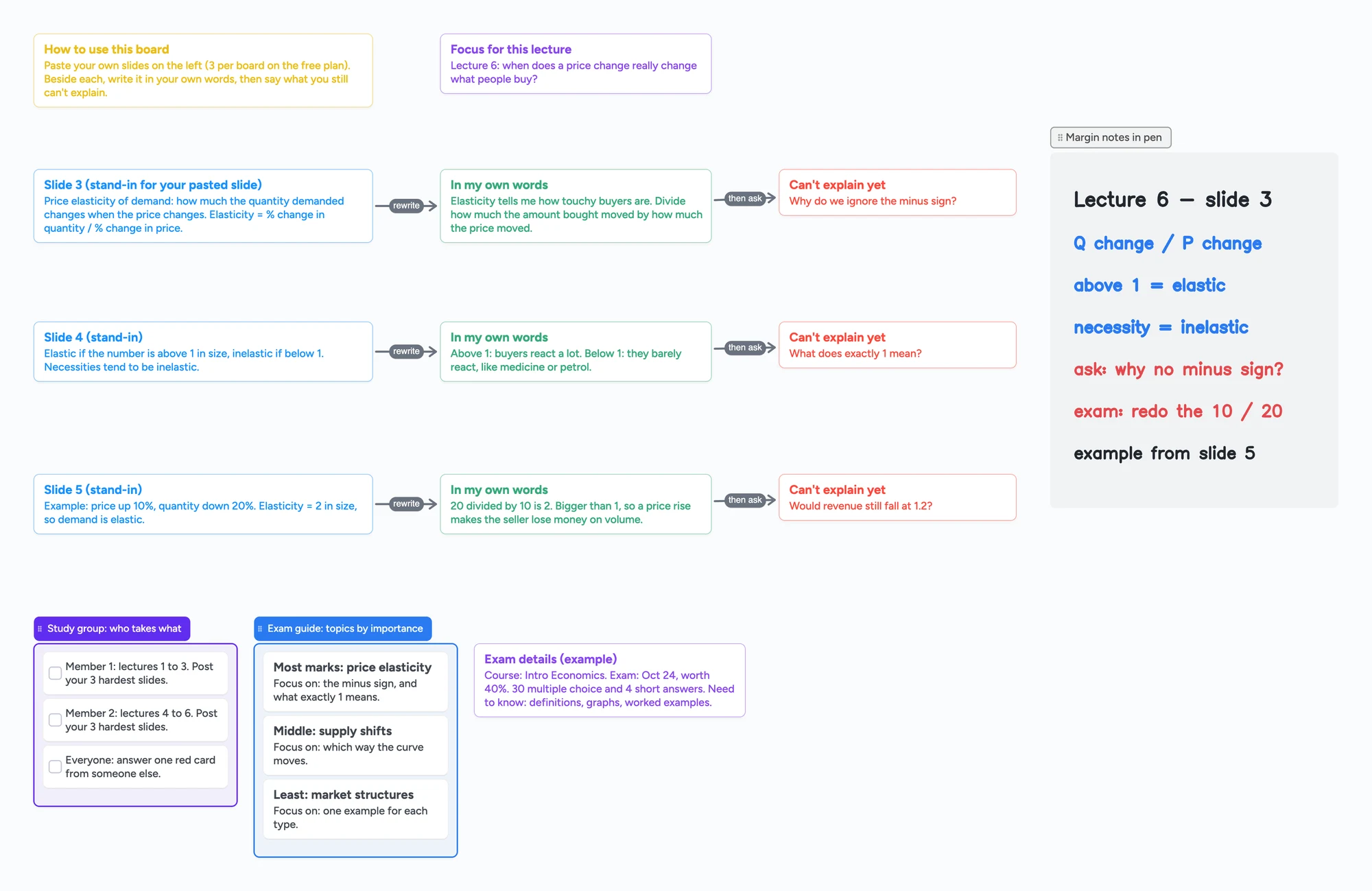
Students keep asking the same thing in r/GetStudying, r/PAstudent, r/NoteTaking and r/StudentNurse: reading the slides again doesn't make them stick. What the replies share is a loop: look at a slide, say it in your own words, then write down what you still can't explain. This page is a board laid out for that loop, with one row per slide and a card for the question you can't answer yet. You put the slides on it yourself. Instaboard does not read, summarize or search them, and the free plan holds 3 images per board.
Opens in your browser. Anyone can view; a free sign-in lets you edit.
Updated
The short answer
- One row per slide: the slide, a card with it in your own words, and a red card for what you can't explain yet. Arrows link them, so the red cards are easy to find before an exam.
- 3 images per board on the free plan. That is 3 slides as pictures. For more, type the slide's key line on a card, or give each lecture its own board (every board counts toward your 5 free boards).
- We don't read, summarize or search your slides. Nothing reads the text on them, and there is no handwriting search. The notes are the ones you write.
- Pen margin notes go in a grey section beside the rows. Pen strokes, sections and arrows don't count toward the 150-item free limit.
- For the exam, rank the topics by importance, add a "focus on" line for each and an exam details card (steps below, paraphrased from a university learning-strategies page).
- For a study group, share the link; each person adds their own rows. Viewing needs no sign-in, adding does, and it is free.
What students say works with slides (one person's view each)
These are replies from four Reddit threads, read in full on November 5, 2026. Each is one person's experience, not research, and they disagree with each other. The board fits the part they agree on: don't just reread.
- Say it, then check it. In r/PAstudent (2022), a top reply goes through the topic list out loud in simple terms, then looks at the slide, and writes down anything missed or wrong. That list becomes a study guide of what didn't stick. That is the own-words card and the red card.
- Don't just summarize. In r/NoteTaking (2025), the poster says summarizing slides in a notebook never produced useful exam notes. One reply says they now rephrase key points in their own words and add examples or questions. Another says slides are part of a bigger picture and suggests drawing coloured arrows between two ideas.
- Rewrite, don't copy. In r/StudentNurse (2022), one reply says to handwrite notes and another says you are rephrasing into shorthand, not copying every slide. A third says to understand the material instead of memorizing it.
- Divide a slide into subsections. In r/GetStudying (2024), a reply splits each slide into subsections such as characteristics, clinical findings and management, and fits 10 or more slides onto one A4 page of mind map.
Others in the same threads prefer flashcards, practice questions or reading the slides several times. The board doesn't replace any of that; it is a place to do the rewrite-and-question step.
How to use the board
- Open the board and sign in free to edit. Set the focus card at the top to the lecture's question.
- Put a slide in each blue card's place. Paste or add a picture of the slide, or type its key line. Remember the limit: 3 images per board on the free plan.
- Write the slide in your own words on the green card. Not a copy of the slide: what you would say to someone who missed the lecture.
- Write what you can't explain yet on the red card. If it is empty, you may be done with that slide.
- Add margin notes with the pen in the grey section: a mnemonic, the page of the textbook, what to ask the lecturer.
- Before the exam, scan the red cards. They are the part of the slides you haven't got yet.
The board is a layout, not a tool that checks your answers. The elasticity example on the ready board is a typed stand-in so you can see the pattern.
The 3-image limit, and what to do about it
The free plan allows 3 images per board and 1 file per board. Slides are usually pictures, so this is the main limit for this use. If your pages are your own handwriting instead, see how to organize photos of handwritten notes.
- Pick the 3 slides you struggle with and type the key line of the others onto cards. A typed card counts toward the 150-item account limit; an image counts as one too.
- One board per lecture. Each board counts toward your 5 free boards, so this works for a few lectures, not a whole course.
- Pro has no image limit. Pro is $5 a month billed yearly ($59.99), or $7.99 monthly.
- Or import the deck as a PDF. Import PDF opens it as its own board of pages you write on, and it uses 1 of your 5 free boards. We don't read or summarize the slides.
From slides to an exam study guide
Once you have your own-words cards, the same board can become an exam study guide. These steps paraphrase the University of Toronto Scarborough's "Create an Exam Study Guide" page (read November 5, 2026), which suggests working from the syllabus, lecture slide titles and chapter titles, and from what your professor repeated or emphasized.
- Make an exam-details card. Course, exam date, how much it is worth, the question types, and what you need to know (definitions, graphs, worked examples). The board has an example in purple. Ask your professor if you can't tell.
- List the topics and rank them by importance. UTSC suggests judging this by how long your "focus on" list is and which topics your professor spent the most time on; you can also ask which topics are worth more marks. On the board this is the blue list: most marks first.
- Write one "focus on" line per topic. This is the part you don't yet understand well, so it comes straight from your red cards.
- Check yourself by explaining it. UTSC says that if you can't explain a topic to someone else concisely, it needs more time. A study group is one place to do that.
- Cross topics off as you get confident, and start with the most important ones.
The Rutgers Learning Centers' "Tips for Using Study Guides" (May 19, 2023; read November 5, 2026) says to make your own guide before looking at the one your professor gives you, then compare the two. Anything in theirs that is missing from yours, or that you don't understand, is a topic to review.
A different view
In r/StudentNurse (2021), one reply says that for nursing classes doing practice questions will probably help more than rewriting things over and over. That is one person's view, and it fits the board's limit: it organizes what you write, and does not test you. Use the practice questions your course provides alongside it.
Finals week: several exams on one board
Read on November 19, 2026. This is for the week when two or more finals land close together. The University of Pennsylvania's Weingarten Center starts with ranking: put your classes in order by which exam is sooner, which matters more for your major, or which is harder, then break the tasks for each class and give each task a time. It suggests 30 percent review and 70 percent practice, cautions against assigning more than 3 hours to one task, and says to plug the tasks into an hourly schedule in Google Calendar, iCalendar or a paper template, with breaks and meals in it. Cornell's Learning Strategies Center five-day plan splits an exam into chunks (by chapter, topic or lecture), about 2 hours a day, and mixes preparation and review instead of doing all of one and then all of the other. It adds that two or three exams in one week means getting creative.
Students in two Reddit threads give versions of the same first step, and disagree after it. In r/GetStudying (May 2021), u/OnceBlackVelvet ranked five exams from earliest to latest and gave each subject one or two days, depending on the workload and how well they understood it; u/Adventurous-Maybe165 listed the actionable steps for each subject in a table by lesson and crossed them off in 2 to 3 hour blocks. In r/EngineeringStudents (October 2024), u/NchyMC gave each course a day when exams were back to back; u/ThyEpicGamer switched subjects every hour, which u/Wes12am said can cause memory interference; u/Fickle_Price6708 recommended 25 minute intervals. Each is one person's method, not research. The board doesn't pick between them.
- Make a list for each exam, named with the course and the date, and put the exam-details card from the exam guide at the top (date, how much it is worth, question types, what is covered). Put the lists in order, earliest exam first.
- Add a card for each topic under its exam, with a "focus on" line from your red cards. Start the title with how well you know it in your own words (know, shaky or lost). Nothing sorts by it; you scan for it.
- Add practice as its own cards. Weingarten's 70 percent is practice, so a card for a past midterm or a problem set counts as much as a topic. The board doesn't give you questions.
- Write the day in the card title ("Tue | limits") if you want an order inside the week. The board has no time axis, so the hours stay in your calendar.
- Cross topics off as you get confident, and work the shaky ones first.
- Items. An exam is 1 list, 1 exam-details card and about 6 topic cards, so 8 items; 5 finals are 40 items and 8 finals are 64 (our arithmetic). The 150 free items run across all your boards, so one board holds the week.
- No hours, no reminders. The board doesn't schedule or time anything and doesn't tell you a block has started. Use a calendar for that, as Weingarten says.
- Notion has a free template. Notion's Marketplace lists "Finals Week Study Plan" at $0 (read November 19, 2026) with study content, to-do lists, progress tracking and scheduled study sessions. If you want a database with status and dates, that is the better choice.
- Written for college and nursing students, the same as the rest of this page.
Cards here are not flashcards
A card on this board is a note you place and move, not a flashcard. Instaboard has no flashcard, quiz or spaced-repetition mode: nothing flips, tests you or schedules a review. For that, use a flashcard tool: Anki describes itself as "a flashcard program that helps you spend more time on challenging material" and schedules each review after you rate your recall (apps.ankiweb.net, read November 11, 2026); RemNote lists flashcards for spaced repetition and practice quizzes (remnote.com, read November 11, 2026); Quizlet's home page says it turns notes into study guides, flashcards, practice tests and games (quizlet.com, read November 11, 2026).
A split that works: use the board to see how the ideas connect and to find the red "can't explain yet" cards, then drill those in a flashcard tool.
Share one board with your study group
The UNC Learning Center's study group handout (read November 5, 2026) says students find groups help them "externalize their thoughts", keep sessions stimulating and keep each other accountable. It adds that groups work best small enough for everyone to ask and answer questions, and suggests a facilitator, ground rules such as taking turns asking and answering, and meeting about once a week for 60 to 90 minutes. For groups that meet online it names Zoom, Microsoft Teams and GroupMe, and suggests looking for online versions of what you miss, such as a whiteboard.
- Split the lectures. The study group list on the board has a task per person: lectures 1 to 3, lectures 4 to 6. Each posts their 3 hardest slides as new rows.
- Answer each other's red cards. The last task on the list is to answer one red card from someone else. That is the group's active-study step.
- Share the link, or use the code for a live session. A new board starts view-only for people with the link; choose "Anyone who joins can edit" in Share to let the group write. A 4-digit join code expires after 2 hours of inactivity.
- Each member signs in free to write. Each member's board count includes boards opened from a link, so a member at 5 boards can still open it but the app says it won't be added to their boards.
- Call on the board. Free calls run up to 60 minutes per call, with a warning 10 minutes before the end. Everyone needs a free sign-in; calls aren't recorded.
Ask members to put their first name on their cards. There is no roster, per-person view or grading.
When something else is the better choice
- You want a summary written for you. AI summarizers and study-guide makers read your slides and produce notes. We don't. If that is what you want, you will be disappointed here.
- You want to annotate the PDF itself. Notes apps built for marking up PDFs let you write directly on the slide pages; one r/PAstudent reply imports the slides into Notability and takes notes on them. Instaboard can import a PDF as pages you write on, but each PDF becomes its own board, so a notes app suits a semester of decks better.
- You need spaced repetition. Anki schedules each review after you rate your recall, and RemNote lists spaced-repetition flashcards. The board has no flashcards or scheduling.
- You need practice questions. Several replies stress them. Use the ones your lecturer or a question bank provides.
- You want a mind map laid out for you. Mind-map apps place each branch automatically; on a board you place every card yourself. MindMeister alternatives covers what its free plan keeps and where else a map can live.
- You are planning a thesis, not a course. A thesis is chapters, papers and advisor comments rather than slides; see how to plan a thesis on one board.
What this board doesn't do
- It doesn't read, summarize, search or grade slides. No text recognition, no handwriting search.
- Writing needs a free sign-in. Viewing a shared board doesn't.
- The free plan is 5 boards and 150 items per account (cards, lists, images, text boxes; pen strokes, sections and arrows don't count), with 3 images and 1 file per board.
- Written for adult learners and students 13 and older. Instaboard's terms say users are not minors.
Start from the ready board
It opens in your browser in a few seconds, with nothing to install. Sign in for free when you want to save it and share it.
Questions
How do I study from lecture slides?
Students in the threads we read go through a slide, say it in their own words, then note what they still can't explain, instead of rereading. Each is one person's method, and others prefer flashcards or practice questions. The board lays that loop out as a row per slide.
Can I put my lecture slides on a board?
Yes, as pictures: paste or add an image. The free plan allows 3 images per board. For a whole deck, import the PDF: it opens as its own board of pages you write on and uses 1 of your 5 free boards.
How do I make a finals week study plan on a board?
Make a list for each exam in date order, put the exam details at the top, add a card for each topic and mark how well you know it. Weingarten Center and Cornell both advise ranking exams and splitting each into chunks; the hours go in a calendar, because the board has no schedule or reminders.
Does Instaboard summarize my slides?
No. It doesn't read, summarize or search them, and it has no text recognition. The notes are the ones you write.
Can a study group use one board?
Yes. Share the link with edit turned on, or a 4-digit join code for a live session. Each person signs in free to write. The free plan has no limit on collaborators.
Is Instaboard free?
Yes. The free plan includes 5 boards, 150 cards and items across your account (pen strokes, arrows and sections don't count), 3 images and 1 file per board, unlimited collaborators and video calls up to an hour. Pro is $5 a month billed yearly ($59.99 a year), or $7.99 monthly, and the people you invite join free.
Sources
- Reddit r/GetStudying: Studying using lecture slides (2024-09-18; read in full, Nov 5, 2026)
- Reddit r/PAstudent: What's your method of studying directly from powerpoints? (2022-09-29; read in full, Nov 5, 2026)
- Reddit r/NoteTaking: How to best retain information from slides? (2025-01-24; read in full, Nov 5, 2026)
- Reddit r/StudentNurse: How to study 100+ worth of slides for med surg? (2022-08-19; read, Nov 5, 2026)
- University of Toronto Scarborough: Create an Exam Study Guide (read in full, Nov 5, 2026)
- Rutgers Learning Centers: Tips for Using Study Guides (2023-05-19; read in full, Nov 5, 2026)
- Reddit r/StudentNurse: How do you all create your study material / take notes effectively? (2021-09-28; read in full, Nov 5, 2026)
- UNC Learning Center: Study Groups (read in full, Nov 5, 2026)
- University of Pennsylvania Weingarten Center: How to Create a Finals Week Study Plan (read in full, Nov 19, 2026)
- Cornell Learning Strategies Center: Five-Day Study Plan (read in full, Nov 19, 2026)
- Reddit r/GetStudying: How to study for multiple final exams at the same time (2021-05-16; read in full, Nov 19, 2026)
- Reddit r/EngineeringStudents: How do you guys study for multiple exams at once? (2024-10-26; read in full, Nov 19, 2026)
- Notion Marketplace: Finals Week Study Plan (read Nov 19, 2026)
- Anki: powerful, intelligent flashcards (read Nov 9, 2026)
- RemNote: flashcards, quizzes and notes (read Nov 11, 2026)
- Quizlet: study tools and learning resources (read Nov 11, 2026)
Related
How to take anatomy & physiology notes (with a filled example board)
How to take anatomy and physiology notes on a board you can edit: draw the feedback loop first, then terms, examples and a self-quiz. A filled homeostasis example built from OpenStax A&P 2e, for college and nursing students.
Cornell notes, digital: cue cards that stay linked to your notes
How to take Cornell notes on a screen: a filled example (glycolysis) with cue cards joined to note cards by arrows, a self-quiz checklist and a summary. What a board does that a printable can't, and where a printable is better.
Build an immune system concept map: innate vs adaptive, step by step
Build an immune system concept map: innate and adaptive clusters, then one infection traced to memory. An editable board, sourced from OpenStax. No AI.
Whiteboard for Google Classroom: share one board with your class
Post one shared Instaboard board in Google Classroom or on a Google Sites page as a link. Set it so the class can write; students 13+ sign in free. No grading.