For novelists and screenwriters
Outline a novel or screenplay with index cards, on a board you can share
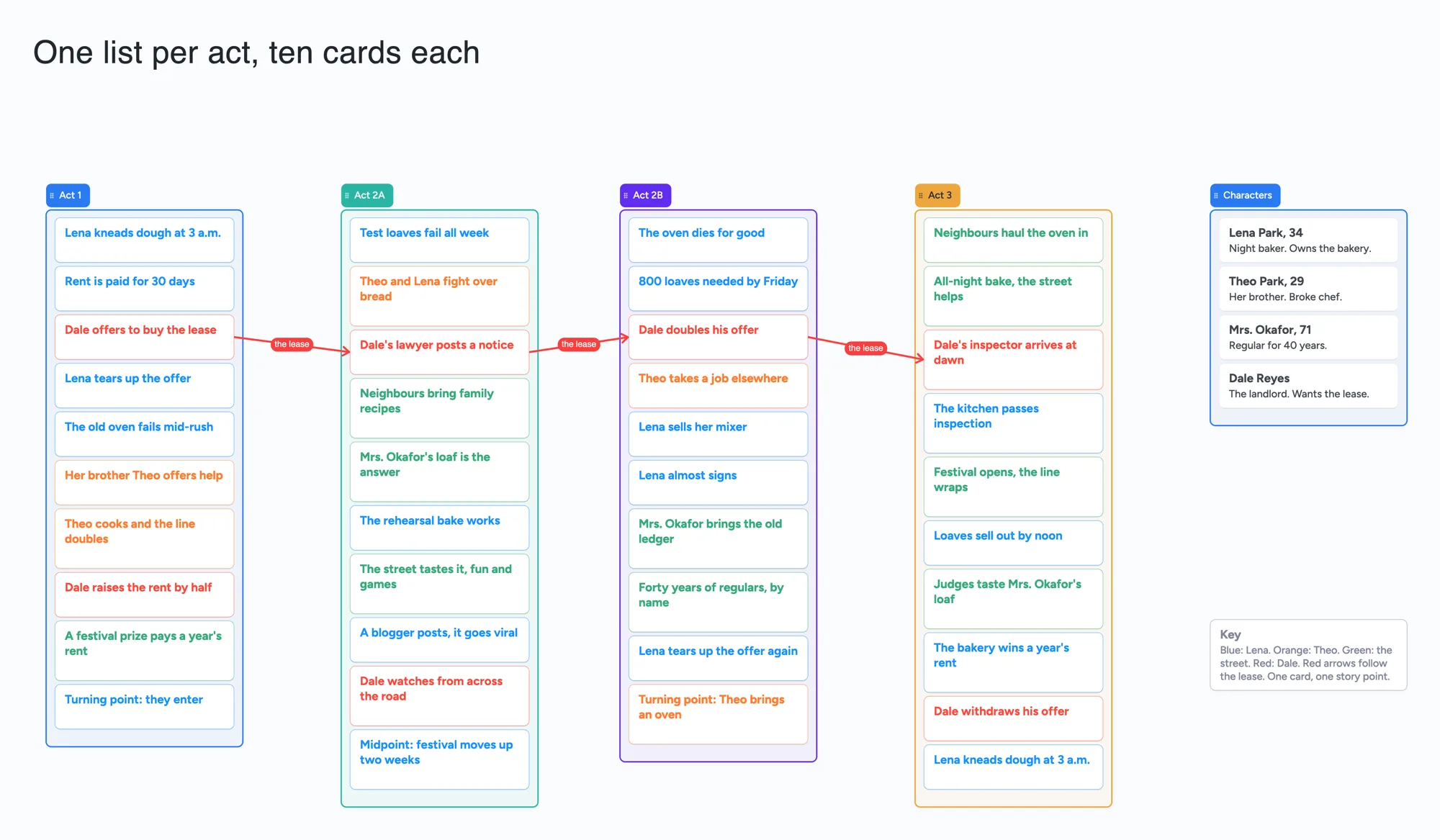
The index-card method is simple: one beat per card, the cards in four acts, and you move them until the story holds. This page shows it on a board: one list per act, ten short cards in each, a list of characters and red arrows for a subplot. It is an outline tool only. It has no script formatting, no drafting, no word count and no export to Final Draft, Scrivener or Plottr, and a long novel with a story bible will pass the free plan's 150 items.
Opens in your browser. Anyone can view; a free sign-in lets you edit.
Updated
The short answer
- What it is: one board with a list per act and one card per beat. Each card holds a few words. You drag cards between lists until the order works.
- What it isn't: no screenplay formatting, no manuscript editor, no word count, no timeline view, no character database, and no export to Final Draft, Scrivener or Plottr. Selected cards and lists can be saved as a PNG.
- The example board uses 51 of your 150 free items: 45 cards, 5 lists and 1 title text box (our arithmetic). Each card and each list counts; pen strokes, sections and arrows don't. A long novel with a story bible will pass 150, and Pro removes the limit.
- A co-writer needs a free sign-in to write. They can open the link and look without one.
What this outline board can't do
- It holds the outline, not the script. There is no screenplay format, no scene headings, no page count and no word count. You write the pages in your script software or word processor.
- No export to Final Draft, Scrivener or Plottr and no import from them. Selected cards and lists can be saved as a PNG.
- No timeline view and no character database. The Characters list is four plain cards. You can't filter by character.
- 150 items on the free plan, across your account. Each card and each list is 1 of the 150. The example board is 45 cards, 5 lists and a title text box, so 51. A 90-scene novel in four act lists is 94 before any characters (our arithmetic), and a story bible on top passes 150. Pro is $5 a month billed yearly ($59.99 a year) and removes the item limit.
- 5 boards and 3 images per board on the free plan. Keep one board per project. The example board has no images.
- You arrange cards by hand. Cards stay where you put them, and a list keeps its cards in the order you give them.
How to outline with index cards on the board
Screenwriting.io describes the Save the Cat method as breaking a screenplay into 15 beats and then into 40, with 10 cards each in Act 1, Act 2A, Act 2B and Act 3. That 10/10/10/10 split is the layout of the example board. The card text on it is our own invented story, and the beats are described in our own words. Save the Cat has its own Beat Sheet Mapper on the Save the Cat site; this page copies none of its beat names. For a novel, the 15-beat novel beat sheet board puts scene cards under each beat.
- Make one list per act. Name them Act 1, Act 2A, Act 2B and Act 3 (or Act 1, 2 and 3 if you prefer three).
- One beat per card, in a few words. John August's hints for index cards say to keep them short, up to seven words, and that most movies can be summarized in fewer than 50 cards. Every card on the example board is seven words or fewer.
- Code the cards by storyline. August suggests a letter code for characters. On the board, a card colour does the same job: blue for Lena, orange for Theo, green for the street, red for Dale. The colour key sits at the bottom of the board.
- Mark the turning points. The last card of Act 1 and of Act 2B starts "Turning point:" and the last card of Act 2A starts "Midpoint:". Name them however your structure does.
- Move cards until the order holds. Drag a card to another spot in its list or into another list. That is the whole method.
Writers disagree about whether software helps. In r/Screenwriting (January 2022), one person who works with four rows of ten cards said that software notecard modes are usually lacking the ability to arrange each row separately, and that they used MURAL to co-write with a partner far away. That is one person's view. A list on this board keeps its own cards, so each act is its own column of cards.
Counting the cards: four rules of thumb and what they cost on the board
Writers do not agree on how many cards a feature needs, and the rule you pick sets how much of the 150 free items you use. Cards and lists count; pen strokes, sections and arrows do not. The example board has 45 cards, 5 lists and a title text box, which is 51 items.
| Rule of thumb | Cards | Items on the board (our arithmetic) |
|---|---|---|
| Save the Cat as 40 beats in four acts of ten (Screenwriting.io) | 40 | 44 with four act lists |
| John August: most movies can be summarized in fewer than 50 cards | Up to 49 | Up to 53 with four act lists |
| Half your page count, because scenes average about two pages (u/puttputtxreader, November 2022) | 50 for a 100-page draft | 54 with four act lists |
| Eight sequences of 6 to 10 scenes, one card per scene (u/wfp9, November 2022) | 48 to 80 | 56 to 88 in eight lists |
Swipe the table sideways to see every column.
Sources are listed at the bottom of the page. The two Reddit rules are one person's method each.
All four fit inside the free 150, with room for a Characters list. The same thread has u/puttputtxreader and u/239not235 both saying the cards are just for you, so make them the way that suits your process. If you card each scene of a long script and keep a story bible on the same board, count lists as well as cards before you start.
Follow a subplot with arrows
On the example board, three red arrows labelled "the lease" join the third card of each act list in turn: Dale's offer, his lawyer's notice, his doubled offer and his inspector. You can read the landlord's thread without reading every card. Arrows and sections don't count toward the 150 items. The arrows are part of the example board, and you can delete or redraw them.
An arrow can join cards in different lists, and it can carry a caption and its own colour. It stays attached when you reorder a card inside its list and when you move a whole list, so the thread survives a restructure. Each card also takes its own colour, separate from its list's colour, which is how the example board marks Lena, Theo, the street and the landlord. Lists reorder independently of each other, and you can drag a card from one list into another when a beat moves to a different act.
The novel version: four acts of equal length
Phil Halton's index-card method for a novel, from his own page, plans in four acts of equal length, or in a 5/10/5 split for a 20-chapter book, and notes the subplot on the cards. On the board that is the same four lists, with a card per chapter or per scene instead of per beat.
- Use a short title and one line. A card can hold a bold title and a body, so a scene fits as "Chapter 7: the letter arrives" with one line under it.
- Keep the draft elsewhere. The cards are the plan. Word count, chapters and prose stay in your writing tool.
- Watch the count. One card per scene adds up, so a novel of a hundred scenes uses most of the free plan on its own.
A chapter list or book outline on the same board
A chapter-by-chapter outline is the same job with a different card. Make one list per part (or per act), put one card per chapter in it, and start each title with the chapter number, like "7. The letter arrives", with one line of what changes in the chapter underneath. Colour the cards by point of view or storyline, and drag a chapter to another list when the book's shape changes.
The count is the limit: a 30-chapter book in three part lists is 33 items (30 cards and 3 lists), and a 60-chapter book in four lists is 64 (our arithmetic). For acts, chapters and beats on one board, see the 24-chapter novel outline board. A story bible, a character list and notes on the same account share the same 150, and Pro removes the limit.
Plot, cast and places on one board
A novel needs more than the chapter list, so a second layout puts the plot, the cast and the places on one board, each in its own section. Sections are frames that group lists and cards and cost nothing; lists and cards are what count.
- Plot: three act lists with 24 chapter cards between them, 27 items (3 lists and 24 cards).
- Cast: one list with 12 character cards, 13 items.
- Places: one list with 8 place cards, 9 items.
That is 49 of the free 150 items, with 101 left (our arithmetic). Colour the character cards by role and draw an arrow from a character to the chapter where they first appear.
Where it stops: an arrow joins two cards, but you cannot link a card by name, there are no backlinks, and a card cannot show every chapter that mentions a character. Wiki tools do that. Kanka's home page says that in a session log you @mention a character and it links automatically, and its free tier has unlimited campaigns and entries. LegendKeeper's pricing page lists a free plan to collaborate in other people's projects, while creating your own projects needs a subscription, listed at $7.50 a month on its annual toggle with $9 shown beside it. Obsidian links notes to each other; its Canvas help says text-only cards don't appear in Backlinks until you convert them to a file. If you need those links, use one of them for the story bible and keep the board for the shape of the plot. For characters as a map of who relates to whom, see the character relationship map; for scene cards by point of view, the digital corkboard.
Apps to organize a novel, and where a board fits
Ask which app organizes a novel and the answers differ, because the apps do different jobs. Reddit threads on it (r/WritingHub, r/Screenwriting) name everything from Google Docs to Scrivener to Notion, each one person's view. This board does one job: a shared wall of scene cards you move by hand.
- It doesn't draft. No manuscript editor and no word count. The text lives in your writing app.
- No timeline and no character database. Cards sit in lists; you can't filter or search across them.
- 150 items, 5 boards and 3 images per board on the free plan. A 60-chapter outline in four lists is 64 items (our arithmetic); a story bible on top can pass 150, and Pro removes the limit.
| Tool | Best for | Free plan or price, as listed | Sharing, as listed |
|---|---|---|---|
| Instaboard | A shared visual wall of scene cards | Free: 5 boards, 150 items, 3 images per board; Pro $5 a month billed yearly | Anyone with the link can view without an account; a co-writer signs in free to write |
| Scrivener | Outline and manuscript in one project | 30-day free trial on its store page; sold for macOS, Windows and iOS | Compiles to Word, PDF, Final Draft or plain text |
| Plottr | Outlining and a series bible | $60 a year or $150 once on desktop; Pro $9.99 a month or $99 a year adds the browser app and cloud sync; 30-day free trial | Real-time collaboration is on Pro, and each collaborator needs their own Pro |
| Campfire | Manuscript and world modules in one app | Free: 25,000 manuscript words, 10 characters, 20 timeline events, 2 relationship webs; Standard $12 a month | Pricing page lists inviting as many collaborators as you want |
| Reedsy Studio | Writing the manuscript free, with Boards | Core writing free; Boards limited to card view; unlimited Boards need the Outlining add-on | Its FAQ on sharing a Board with a collaborator: "Not yet" |
| Notion | A general workspace for notes and databases | Free for individuals; Plus $10 per member a month | No novel or co-writing claim on its pricing page |
| Milanote | Image-heavy mood boards and notes | Free: 100 notes, images or links and 10 uploads; $9.99 a month billed annually | Unlimited shared boards on every plan |
Swipe the table sideways to see every column.
Each row is from the maker's own pages, read on November 12, 2026. Plans change, so check the page before you buy. This is the set of tools we checked on that day, not every writing app.
A board fits when two writers want one wall of scene cards in a browser without buying a plan each. For a draft beside the outline, Scrivener or Campfire is the better choice. For a timeline or series bible, see Plottr and its free alternatives. For scene cards with a corkboard look, see the digital corkboard, and for a worked plot with suspects and clues, the mystery novel outline board.
The best app to outline a novel depends on what you need
Roundups of the best novel outlining apps disagree because the apps do different jobs. This is a short pick-by-need list, not a ranking. We make Instaboard, so read our entry with that in mind. Every line is from the maker's own pages, read on November 13 or 15, 2026, and plans change, so check the page before you pay.
- Two writers on one wall of scene cards, in a browser, free: Instaboard. Cards, lists, arrows and pen ink on one canvas; anyone with the link can view, and a co-writer signs in free to write. It doesn't draft, has no word count, timeline or character database, and a full novel passes the free plan's 150 items (Pro removes the limit).
- Outline and draft in one project: Scrivener, Dabble or Campfire. Scrivener has a 30-day free trial and licences for macOS, Windows and iOS. Dabble's Writer plan is $15 a month billed annually and lists a Plot Grid and co-authoring, with 14 days free. Campfire's free plan caps the manuscript at 25,000 words and 10 characters, Standard is $12 a month, and its pricing page lists inviting as many collaborators as you want.
- A series bible and plot timelines: Plottr. It costs $60 a year or $150 once on desktop; Pro at $9.99 a month or $99 a year adds the browser app, cloud sync and real-time collaboration, and each collaborator needs their own Pro. It has a 30-day free trial and doesn't write the book. More in Plottr and its free alternatives.
- A free, writer-only index card app, working alone: Scrībō. Free is unlimited cards, three projects, collapsible acts, five colours and export to text, CSV, JSON and Fountain; Pro is $4.99 a month or $49.99 a year. Sharing is a read-only link, so a co-writer can't edit.
- Index cards on an iPhone, iPad or Mac: Card Buddy. Free on the App Store with a $19.99 non-expiring license as an in-app purchase. Its listing describes two-sided cards and neighbouring cards that move aside, and doesn't mention sharing a board.
- A writer-only corkboard with links between cards: Cork. Free is 3 active boards with unlimited cards and share links, Starter is $19 a year, and it exports to Markdown. Its share links are read-only.
- Free on your own computer, with no sharing: Kindling, Manuskript, bibisco or novelWriter. Kindling is free and open source, runs on macOS, Windows and Linux, keeps projects as local files with no account, and its page lists no mobile version. Manuskript is open source for Linux, Mac and Windows with an outliner and index cards, and its site says it is still in development. bibisco's Community Edition is free for Linux, MacOS and Windows; its download page lists the novel outline under the $69 Supporters Edition. novelWriter is free and open source for Linux and Windows; its site says the only way to run it on MacOS is a Python install. None of them is a board two people edit by link.
- Notes you already keep in Obsidian. Obsidian is free to use, and its Canvas plugin lays out notes and connects them with lines. Sync, at $4 per user a month billed annually, is what its pricing page lists for collaborating on shared vaults. Obsidian is better when the outline should link to the notes behind it. It is not a shared wall of cards you open in a browser.
- A free web outliner for working alone: Storyline Creator. Its Free plan is limited to 7 scenes, 5 characters and 3 locations and has no timeline; the paid plan is €79.98 a year at the yearly rate, or €299 once. It also drafts text and offers AI-written scenes, which we do not.
- Write the manuscript free: Reedsy Studio. Core writing is free; on the free plan Boards are limited to card view, and sharing a Board with a collaborator is "Not yet" in its own FAQ.
- One workspace for everything: Notion. Free for individuals, Plus is $10 per member a month. You build the outline yourself; its pricing page makes no novel claim.
- A mood board heavy on images: Milanote. Free is 100 notes, images or links and 10 uploads, with unlimited shared boards; paid is $9.99 a month billed annually. Instaboard allows 3 images per board.
For the index-card apps side by side, see the digital corkboard page. For a worked plot with suspects and clues, the mystery novel outline board.
Outlining with a co-writer
This is a smaller part of the page, because we found no searches for it. It works like this:
- In the share menu, set "Anyone with the link can edit".
- Send the link, or the 4-digit join code. The code expires after 2 hours of inactivity, so send the link to someone you'll need later.
- Your co-writer signs in free (Google, Apple or email) to write. Someone who isn't signed in can open the link and read everything, but can't change anything. Once they're signed in, what they add shows up on your board within a few seconds.
- The board counts as one of their 5 free boards, and the cards they add count toward their own 150. If they're already at 5 boards, they can still open the link and write; the board just isn't added to their boards.
Outlining a pilot or a season
The same layout works for a TV pilot or a season, as a smaller use. Make one list per episode, put a short card for each beat in it, and start each card with "A:", "B:" or "C:" for the story it belongs to. Use arrows for a thread that runs across episodes.
The count is the limit: 8 episodes of 10 cards each is 88 items (8 lists and 80 cards), and 10 episodes of 15 cards is 160 (10 lists and 150 cards), which passes the 150 free items and means Pro (our arithmetic).
One person's view from r/Screenwriting (August 2020, the top reply, 87 votes) was that for a spec series you don't plan the whole thing: "Pilot and a bible" and move on. Whether that holds for your project is your call. The board is useful for the pilot and a short season outline, not for planning 360 pages.
If you work on a TV writers' room project, Final Draft, WritersRoom Pro and Arc Studio are made for it (table below).
On an iPad
Instaboard has an iPad app with a pressure pen, so you can handwrite or draw beside the cards, and the same board opens in a browser. Several index-card apps are made for the iPad. Each row is from the maker's own page, read on November 15, 2026.
| Tool | Where it runs | Price on its page | What stands out |
|---|---|---|---|
| Instaboard | iPad, iPhone, Android and any browser | Free: 5 boards, 150 items, 3 images per board; Pro $5 a month billed yearly ($59.99 a year), or $7.99 monthly | Cards, lists, arrows and pen ink on one canvas; a co-writer signs in free to write |
| Card Buddy | iPhone, iPad and Mac | Free with in-app purchases | An infinite corkboard where neighbouring cards move aside, two-sided cards, images on cards and a Kanban layout; its listing does not mention sharing a board |
| CardBeat | iPhone and iPad | Free for two boards; unlimited boards are a one-time purchase, no subscription | Handwriting with Apple Pencil on cards, iCloud sync between your devices, no account; a board exports as a PDF or as a CardBeat file a co-writer can import |
| Scrībō | Any browser, on any device | Free: unlimited cards and three projects; Pro $4.99 a month or $49.99 a year | Collapsible acts and five colours; sharing is a read-only link, and it exports to Fountain |
Swipe the table sideways to see every column.
Read November 15, 2026. The App Store listings describe what each app does; we did not test them. CardBeat's listing shows 33 ratings, Card Buddy's 44.
Card Buddy and CardBeat are better if you plot alone, want a native app and want your boards to stay on your devices. Instaboard is for a board a co-writer or editor opens by link and writes on live. It is not a place to draft.
Index cards inside screenwriting software, and when a separate board is better
Most screenwriting programs have a card view, and they are the better choice when a card must stay attached to the script. The difference is what a card is. In Final Draft's Index Cards each card is one scene, locked into a grid in script order. Final Draft's own tip says the Beat Board is the pre-writing tool, with beats placed wherever you want, and that the Index Cards "can help you refine your story after it's been written" (September 5, 2025). We make Instaboard, a board with no script behind it, so each row below is from the maker's own pages.
| Tool | What a card is | Plan on its page | Why you might pick it over a separate board |
|---|---|---|---|
| Final Draft 13 | Index Cards: one card per scene, in script order, with the scene summary copied into the script. Beat Board: free-placed beats not tied to scenes | Listed at $199.99 (crossed-out $249.99), or a subscription at $16.99 a month; macOS and Windows, not Chromebook | The cards and the script are one file. Its help says people can collaborate on the Beat Board with Final Draft 13 |
| WriterDuet | Cards: each scene is a card, grouped by Act or Sequence; moving a card changes the order of the script | Free: 3 projects; free users can co-write on an upgraded user's script. Plus $9.99 a month, with real-time collaboration | Same file as the script. Its help says cards cannot be edited or rearranged in the mobile app or in phone and tablet browsers |
| Fade In | Index cards for the scenes, plus a Navigator that reorders scenes and creates nested sequences | $79.95 one time (crossed-out $99.95), for Windows, Mac and Linux; cloud collaboration is its optional Fade In Access service | A one-time price, and the script is written in the same program |
| Arc Studio | Plot Board: columns are acts, cards are beats tagged with storylines, characters and locations, with a Beat Inbox | Free $0, Essentials $69 a year, Pro $99 a year; outlining tools and inviting collaborators are on Pro only | Tags and filters, and the beats sit beside the script |
| Instaboard | Any card: a scene, a sequence, a beat or a note, in a list you name | Free: 5 boards, 150 items; Pro $5 a month billed yearly ($59.99 a year), or $7.99 monthly | A co-writer or editor opens it by link in a browser and writes on it live, with pen ink and arrows. There is no script behind it |
Swipe the table sideways to see every column.
Read November 15 and re-read November 17, 2026. The Final Draft, WriterDuet, Fade In and Arc Studio rows are from their own help, pricing and product pages; we did not test them. Prices change, so check the page before you buy.
Writers in r/Screenwriting describe the same gap. In September 2021 u/Alex-alternate wanted a card to be a beat or a sequence, but found WriterDuet's cards strictly one per scene with a flat hierarchy. u/FormicaDinette33 and u/rangerpax answered that Fade In lets you nest cards, and an account named WriterDuetGuy replied that WriterDuet can group cards by Act or Sequence. In November 2025 u/Appropriate-Newt-485 called Final Draft's Beat Board clunky and wished it could take imports, pasted images and drawing, and u/mark_able_jones_ said: "All I really want are custom size notecards that I can color code and move around." In June 2019 u/_peterjames_ said they use index cards more in rewriting and plot beats in Trello lists. Each is one person's view.
- Use the program's cards when a card should be a scene. Moving the card moves the scene in the script. A board here moves nothing but the card.
- Use a separate board when a card is not a scene. A sequence, a character, a note or a thread across acts fits in a list you name, with arrows between lists.
- Use a separate board when a co-writer or editor should open it by link. They sign in free to write, and the board counts as one of their 5 free boards.
- What the board will not do. It has no script format, no scene numbers, no export to Final Draft, WriterDuet, Fade In or Arc Studio, and no link between a card and a page.
Index card tools for writers, side by side
Each row is from the maker's own pages, read on November 7, 2026. Prices change, so check the page before you buy.
| Tool | Built for | Price on its page | What stands out |
|---|---|---|---|
| Instaboard | Any visual organizing, with a pen | Free: 5 boards, 150 items; Pro $5 a month billed yearly | Lists, cards and arrows on one canvas; any browser and the iPhone, iPad and Android apps; a co-writer signs in free to write |
| Cork | Writers | Free: 3 boards; paid plans from $19 a year | Kanban columns per act or per episode, a free corkboard view, Markdown export; its screenwriter page says it has no real-time collaboration |
| Plottr | Planning a novel or series | Plottr $60 a year (desktop); Pro $9.99 a month or $99 a year; 30-day free trial | Templates, series bible, word-count tracking; real-time collaboration is on Pro |
| Scrivener | Writing the whole manuscript | Free trial on its store page; see Scrivener for the price | Every section has a virtual index card, and moving a card reorders the manuscript; compiles to Word, PDF, Final Draft and plain text |
| Dabble | Writing a novel | Writer $15 a month billed annually | Pricing page lists a Plot Grid and co-authoring, with a 14-day trial |
| Milanote | Mood boards and creative projects | Free: 100 notes, images or links and 10 uploads; $9.99 a month billed annually | Free boards with no time limit; many images |
| Final Draft | Writing screenplays | See Final Draft for the price | Beat Board with colour-coded beats and Flow Lines, an Outline Editor, send outline to script; Mac and Windows, not Chromebook |
Swipe the table sideways to see every column.
Sources are listed at the bottom of the page, all read on November 7, 2026.
When another tool is the better choice
- You want a cork wall for writing and nothing else. Cork is made for it, with columns per act and a free plan of 3 boards. The free plan counts boards, not cards.
- You are planning a whole series or book with a bible. Plottr is built for that, with templates, a series bible and word-count tracking, from $60 a year on the desktop. Live co-plotting there is on Pro; see a free way to plot with a partner.
- You write the whole manuscript in one place. Scrivener ties each section to a virtual index card, so moving a card moves the text. Instaboard holds no manuscript text.
- You like Scrivener's corkboard but write on a device it doesn't list. Scrivener's overview page names iOS, macOS and Windows. The board here runs in a browser, so it is a way to lay out and move index cards there. It does not write or compile a manuscript, and moving a card here does not move any text.
- You write a novel and want plot and co-writing in one writing app. Dabble's pricing page lists a Plot Grid and co-authoring on its Writer plan.
- You need to put a beat board into a script. Final Draft's Beat Board sends your outline to the script. Its product page lists Mac and Windows, not Chromebook.
- You work on a TV series. WritersRoom Pro has Season, Character and Scrap boards and revision history; its Indie edition is $9.98 a month and its Partner edition $17.98 a month, both for personal, non-commercial use. Arc Studio's Pro plan ($99 a year) lists outlining tools and inviting collaborators, and its Free plan lists neither.
- You have a lot of images. Milanote's free plan allows 100 items and 10 uploads. Instaboard allows 3 images per board.
For scene cards by point of view, drafted ticks and a corkboard look, see the digital corkboard for writers. If the cards are interviews and scenes you have or still want, see a documentary outline board.
Start from the ready board
It opens in your browser in a few seconds, with nothing to install. Sign in for free when you want to save it and share it.
Questions
Can I outline a novel with index cards online for free?
Yes. Instaboard's free plan has 5 boards and 150 items, and each card and each list counts. A short outline fits. A novel of a hundred scenes plus a story bible will pass 150, and Cork's free plan has 3 boards.
How many index cards should a screenplay have?
It depends on the method. Screenwriting.io describes Save the Cat as 40 beats in four acts of ten, and John August's hints say most movies can be summarized in fewer than 50 cards. The example board has 40 beat cards. Other writers count half the page count, or 6 to 10 scenes in each of eight sequences; see the counting table above.
Can two people outline a screenplay on the same board?
Yes. Set "Anyone with the link can edit" and send the link. Your co-writer signs in free to write, and the board counts as one of their 5 free boards.
Can I use it for a chapter-by-chapter outline?
Yes. Make one list per part, one card per chapter, and drag chapters between lists. A 30-chapter book in three lists is 33 of your 150 free items. It holds the outline only, not the chapters' text.
What is the best app to organize a novel?
It depends on the job. Scrivener keeps the outline and the manuscript in one project, Plottr is built for outlining and a series bible, Campfire adds world modules and a manuscript, and Reedsy Studio writes the manuscript free. Instaboard holds only the outline, as a shared wall of scene cards. The table above lists each maker's own plan terms.
Can I organize a novel on a board for free?
Yes, for the outline. The free plan has 5 boards and 150 items, and each card and each list counts; pen strokes, sections and arrows don't. A 60-chapter outline in four lists is 64 items (our arithmetic). Anyone with the link can view without an account, and a co-writer signs in free to write. It has no drafting, word count, timeline or character database.
What is the best app to outline a novel with index cards?
It depends on the job. Scrivener and Dabble keep index cards beside the draft, Plottr is built for outlining and a series bible, and Scrībō, Card Buddy and Cork are index-card apps made for writers. Instaboard is for two writers sharing one wall of scene cards in a browser: a co-writer signs in free to write, and it has no drafting. A full novel passes the free plan's 150 items. The list above gives each maker's own plan terms.
I don't want a rigid template, what should I use?
A blank board. Instaboard has far fewer templates than Plottr, so you make the lists and cards you want and rename them. Plottr and Dabble start from structure, Plottr's templates and Dabble's Plot Grid, and Scrivener's corkboard is free-form but is tied to the draft. If you want a filled example to copy, the 4-act screenplay board on this page and the [24-chapter novel board](/novel-chapter-outline-board) are examples, not rules. Delete what you don't need, because every card and list counts toward the free 150.
Can I use it as a Scrivener corkboard without Scrivener?
For the cards, yes: scene cards you drag, colours, and lists for acts or parts. Not for the text. Scrivener ties each card to a section of the manuscript, so moving a card moves the text. Here a card holds only the outline, and there is no import from or export to Scrivener. Scrivener's own pages describe a perpetual licence for each platform and version with a 30-day free trial, and show US$23.99 for iOS and iPadOS; check its store for the macOS and Windows prices.
Does it format a script or export to Final Draft?
No. It has no script format and no export to Final Draft, Scrivener or Plottr. Selected cards and lists can be saved as a PNG. Write the script in a script editor.
Can I plan a TV pilot or season on it?
For a pilot or a short season, yes: a list per episode and cards tagged A, B or C. Ten episodes of 15 cards is 160 items, which passes the free 150. For a writers' room, Final Draft, WritersRoom Pro and Arc Studio are built for it.
Should I use Final Draft's Beat Board or its index cards?
Final Draft's own tip says the Beat Board is for laying out the story before you write, with beats placed freely, and the Index Cards, one card per scene in a grid, are for refining the story after the pages exist. A separate board like Instaboard is closer to the Beat Board and has no script behind it, so it cannot send anything to Final Draft.
Which screenwriting software has index cards?
Final Draft (Index Cards and a Beat Board), WriterDuet (Cards), Fade In (Index Cards view) and Arc Studio (Plot Board, on its Pro plan) all do. The table above lists what a card is in each and what each plan costs on its own page, read November 15, 2026.
Is it better than Scrivener's corkboard?
Not for drafting. Scrivener's index cards are attached to your manuscript sections, so moving a card moves the text. Instaboard's cards hold only the outline, and it is a shared board with ink and arrows.
Sources
- Screenwriting.io: how screenwriters use index cards (Save the Cat as 15 beats and 40, read Nov 7, 2026)
- Screenwriting.io: what is Save the Cat (10 beats each in Act 1, 2A, 2B and 3, read Nov 7, 2026)
- Save the Cat: Beat Sheet Mapper (the Save the Cat site's own product, 15 beats; read Nov 7, 2026)
- John August: 10 hints for index cards (2010, read Nov 7, 2026)
- Phil Halton: story outlines with index cards (read Nov 7, 2026)
- r/Screenwriting: four rows of ten cards and MURAL (Jan 2022, one person's account)
- r/Screenwriting: how do you plot a TV series (Aug 2020, one person's view)
- Plottr: pricing (Plottr $60 a year or $150 once, Pro $9.99 a month or $99 a year, 30-day trial, each collaborator needs their own Pro; read Nov 7, Nov 12 and Nov 13, 2026)
- Scrivener: overview (virtual index cards, compile targets, macOS, Windows and iOS; read Nov 7 and Nov 12, 2026)
- Dabble: pricing (Writer $15 a month billed annually, Plot Grid, co-authoring, 14 days free; read Nov 7 and Nov 13, 2026)
- Cork: pricing (free 3 active boards, unlimited cards and share links, paid from $19 a year; read Nov 7 and Nov 13, 2026)
- Cork: for screenwriters (columns per act and episode, no real-time collaboration; read Nov 7, 2026)
- Milanote: plans (free 100 items, 10 uploads, unlimited shared boards, $9.99 a month billed annually; read Nov 7, Nov 12 and Nov 13, 2026)
- Scrivener: store (30-day free trial, licences for macOS, Windows and iOS; read Nov 12 and Nov 13, 2026)
- Campfire: pricing (free plan caps, Standard $12 a month, unlimited collaborators; read Nov 12 and Nov 13, 2026)
- Reedsy Studio: plan a book (Boards card view, sharing a Board "Not yet"; read Nov 12 and Nov 13, 2026)
- Reedsy Studio: pricing (core writing free, Outlining add-on for unlimited Boards; read Nov 12, 2026)
- Notion: pricing (Free for individuals, Plus $10 per member a month; read Nov 12 and Nov 13, 2026)
- r/WritingHub: any good free apps for writing (Mar 2024, many people's answers)
- r/Screenwriting: an app to keep stories and ideas organized (Feb 2025, many people's answers)
- Final Draft: how to use the Beat Board (colour-coded beats, Flow Lines, Outline Editor; read Nov 7, 2026)
- Final Draft: the Beat Board for everything in your script (Map Out Your TV Series; read Nov 7, 2026)
- Final Draft: product page (macOS and Windows, not Chromebook; $199.99 listed; read Nov 7 and Nov 15, 2026)
- WritersRoom Pro: home page (Indie $9.98 a month, Partner $17.98 a month, personal non-commercial; read Nov 7, 2026)
- WritersRoom Pro: the boards (Season, Character and Scrap boards; read Nov 7, 2026)
- Arc Studio: pricing (Free, Essentials $69 and Pro $99 a year; read Nov 7 and Nov 15, 2026)
- Kindling: home and download pages (free, MIT, macOS/Windows/Linux, local files, no mobile version; updated Nov 11, 2026; read Nov 15, 2026)
- Manuskript: home page and README (open source, Linux, Mac OS X and Windows, outliner and index cards, still in development; read Nov 15, 2026)
- Manuskript: README on GitHub (runs on GNU/Linux, Mac OS X and Windows; read Nov 15, 2026)
- bibisco: download page (Community Edition free, Supporters Edition $69, novel outline listed as Supporters only; read Nov 15, 2026)
- novelWriter: home page (free, open source, Linux/Windows, MacOS only via PyPI; release 2026.2 patch 3; read Nov 15, 2026)
- Obsidian: pricing (free, Sync $4 per user a month billed annually; read Nov 15, 2026)
- Obsidian Help: Canvas (text-only cards and Backlinks; read Nov 15, 2026)
- Storyline Creator: pricing (Free limits, €79.98 a year, €299 lifetime; read Nov 15, 2026)
- Kanka: home page (free tier, @mention links; read Nov 15, 2026)
- LegendKeeper: pricing (Basic free plan, Pro $7.50 a month on the annual toggle, $9 shown beside it; read Nov 15, 2026)
- CardBeat on the App Store (iPhone and iPad, two free boards; read Nov 15, 2026)
- Card Buddy on the App Store (iPhone, iPad, Mac; read Nov 15, 2026)
- Scrivener: how our licensing works (perpetual, per platform and version; read Nov 15, 2026)
- Scrivener: buy (30-day free trial; iOS and iPadOS US$23.99; read Nov 15, 2026)
- Scrībō: home page (free and Pro plans, read-only share links, three projects; read Nov 13, 2026)
- Card Buddy on the App Store (iPhone, iPad, Mac, free with a $19.99 non-expiring license; read Nov 13, 2026)
- Cork: home page (read-only share links, Markdown export; read Nov 13, 2026)
- Final Draft: Beat Board vs Index Cards (September 5, 2025; read Nov 15, 2026)
- Final Draft help: How do I use Index Cards? (read Nov 15, 2026)
- Final Draft help: collaboration and the Beat Board in Final Draft 13 (read Nov 15, 2026)
- WriterDuet help: Cards widget and view (read Nov 15, 2026)
- WriterDuet: plans and pricing (Free 3 projects, Plus $9.99 a month; read Nov 15, 2026)
- Fade In: features (read Nov 15, 2026)
- Fade In: buy ($79.95; read Nov 15, 2026)
- Arc Studio help: the Plot Board (read Nov 15, 2026)
- r/Screenwriting: WriterDuet card view and Fade In nesting (Sep 2021, single accounts)
- r/Screenwriting: Final Draft Beat Board complaints (Nov 2025, single accounts)
- r/Screenwriting: how do you use index cards (Jun 2019, single accounts)
- r/Screenwriting: how do y'all use index cards (Nov 2022, single accounts)
Related
A digital corkboard for your scene cards, free to start
A digital corkboard for outlining a novel with scene cards: colour by point of view, drafted ticks, subplot arrows. Honest comparison with Cork, Corkulous, Plottr, Scrivener and Milanote.
A mystery novel outline board for suspects, clues and red herrings
Outline a mystery novel on one board: a list per suspect, clues, red herrings and reveal order. A free ready board, and where Plottr and Sheets do more.
Character relationship map: a filled template two people can edit
A character relationship chart you fill in by hand: a card per character, captioned arrows, shared with a co-writer. No auto-layout or line styles.
Outline a story with a co-writer, on one board you both edit
Outline a story with a co-writer on one shared board: ideas lists for each of you, an agreed outline, a decide-by list. A filled example to copy. Not a drafting tool.
A short film pre-production board: who owns what, on one screen
Plan a short film with a director and a producer on one shared board: cast, crew, gear, permits, locations and shoot days. Free ready board, and where StudioBinder does more.
A free Milanote alternative for student projects, and where Milanote is better
Milanote's free plan stops at 100 notes, images or links. What Instaboard's free plan gives a student project, where Milanote is better, and a ready project board.
A novel beat sheet on one shared board: 15 beats, three acts, scenes under each beat
A 15-beat novel outline to open and edit: 3 act sections, a list per beat, scene cards under each. Free-plan item counts and where other tools are better.