For game jam teams of two to six
A game jam plan your whole team can see and edit
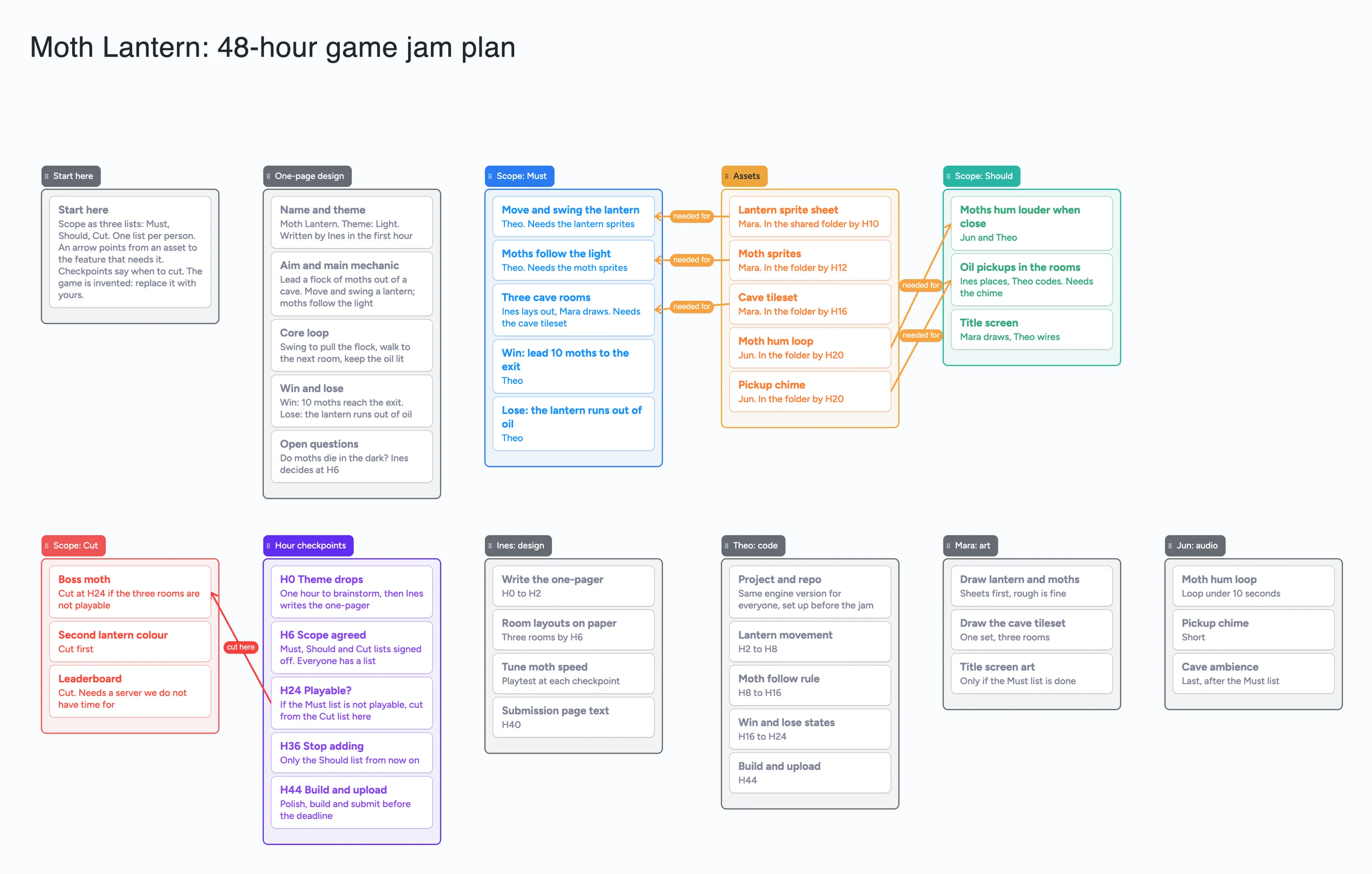
A game jam gives you a day or two and a theme. The plan that keeps a team from over-building is short: what the game is, what must work, what you will cut, and who owns what. This page shows that plan on one shared board: a one-page design, three scope lists (Must, Should, Cut), a list for each person, a list of assets with arrows to the features that need them, and hour checkpoints that say when to cut. The example is an invented 48-hour game, "Moth Lantern", so replace every name with yours. It is a planning board, not a task tracker or a place to keep your files; the tools in the table below do those jobs better.
Opens in your browser. Anyone can view; a free sign-in lets you edit.
Updated
The short answer
- What it is: a one-page design, Must, Should and Cut lists, a list per person, an asset list and a checkpoint list on one board. Arrows take a caption and their own colour, and they stay attached when you reorder cards or move a list.
- What it isn't: not a task tracker, not a code or file store and not a timer. It has no reminders, no timeline axis and no version control. Your art, audio and code live in your repo or shared folder, and the board points at them.
- The example uses 54 of your 150 free items: 42 cards, 11 lists and 1 title text box (our arithmetic). Each card and each list counts; arrows and pen strokes don't. A jam plan fits inside the free limits.
- Your teammates need a free sign-in to write. They can open the link and read the board without one.
- Set the link to edit. New boards start view-only.
What this board can't do for a game jam
- No reminders and no timer. Nothing tells you it is hour 24. The checkpoint cards are words on the board that your team agrees to look at.
- No timeline axis. The hours in the example (H0, H6, H24, H36, H44) are text on cards, not positions on a time line. The board's Calendar view places cards on days, not hours.
- No version control and no file store. A free board holds 3 images and 1 file of up to 10 MB per board. Keep art, audio and code in your repo or a shared folder and write where to find each asset on its card.
- An arrow is only a line. You choose its caption and colour. It doesn't know a feature is blocked when its asset is late; you read the arrows yourself.
- Check an arrow after you move its card. Arrows between cards in different lists stay attached when cards are reordered inside a list and when a whole list moves. We haven't tested what an arrow does when its card is dragged into another list, so look at it after you move one.
- 150 items on the free plan, across your account. Each card and each list is 1 of the 150. The example is 54. Any other board on your account counts too. Pro is $5 a month billed yearly ($59.99 a year) and removes the item limit.
- 5 boards and 3 images per board on the free plan. A teammate who opens your link uses 1 of their own 5 boards, and cards they add count toward their own 150.
How to plan a game jam on one board
This is how the example board is used. The hours are the example's own, for a 48-hour jam with four people; they are not a rule.
- Write the one-page design first (see below). In the example one person writes it in the first hour, after a brainstorm.
- Sort every feature into one of three lists. Must is what makes the game playable. Should is what you add if Must is done. Cut is what you already know you won't finish. Put the Cut list on the board on purpose; an item that is written down is easier to drop.
- Give each person a list. The example has Ines (design), Theo (code), Mara (art) and Jun (audio), each with a few cards that say what and by when.
- Put every asset on the Assets list and point an arrow at the feature that needs it. The cave tileset points at "Three cave rooms", the pickup chime at "Oil pickups". When an asset is late, you see which feature waits for it.
- Write the checkpoints. The example has H0 theme drops, H6 scope agreed, H24 playable, H36 stop adding and H44 build and upload. The H24 card points at the Cut list: if the Must list isn't playable at that hour, cut from the Cut list there.
- Move cards between lists as the jam goes. A Should card that is done goes out of the way; a Must card that slips is a signal to cut.
A written account of one jam team's process, Game Developer's "Game Jams: an agil-ish approach" (July 23, 2020), describes similar steps for a 72-hour jam: break the project into a features list, prioritize it as a team (it names the MoSCoW method of Must, Should, Could and Won't have, and suggests Iteration 1, 2, 3 instead), work in sprints of four to six hours, and once the jam is six or fewer hours from the end, stop adding and polish. Its author tracked sprint work in Trello or Excel and kept the team's written agreements in a Google document. That is one team's method, not a rule.
A one-page game design document on the board
A full game design document is long, and a jam is short. Indie Game Academy's guide (April 29, 2025) says a design document helps keep a project realistic and stop scope creep, and that this is especially useful for a game jam. The example board's "One-page design" list is the small version: five cards for name and theme, aim and main mechanic, core loop, win and lose, and open questions.
The fields come from a one-page template that u/gossiossioss posted in r/gamedesign (May 30, 2023) for smaller projects and jam games: game name, theme, genre, audience, story, visual and audio style, a main aim, a main mechanic, enablers and blockers, the core loop, win and lose conditions and any additional features. In the replies, u/PhilippTheProgrammer suggested calling "Story" "Narrative", merging visual and sound style into "Aesthetics" and adding a "Controls" section. That is one designer's template and one commenter's edits, not a standard. On a board you can add or drop a card for any of them.
A board card holds a short answer, not a document. If your team wants a long written design, write it in a document and keep the one-page version here.
What one big jam team learned
These are single accounts, not a measured pattern. In r/gamedev (August 31, 2025), u/Klightgrove described leading a 50-person team in a jam, with 48 credited developers at the end. They promoted a lead for Art, Audio, Design and Programming, and said the flip side of people joining over time was a lot of administrative work, including constantly updating spreadsheets of people's skills. Their takeaways included "Plan your stretch priorities wisely" and building the team "on a small rock first", meaning securing the essential roles before adding depth in one area, and they reported merge conflicts from several people working in the same scenes.
A four-person team is not a 50-person team. But the same idea holds at any size: say who owns what and what is a stretch goal before the work starts. On the board, owners are the lists and the Should and Cut lists are the stretch goals.
Using the same board for a hackathon team
A hackathon team of three to five people has the same problem as a jam team: a short clock, too many ideas and a demo at the end. The board already has what you need, with a few renames. This section is for the team that is competing or building, not for the organisers. Some hackathons are open to high-school students: if you are under 18, check with a parent or your school.
- Keep the three scope lists. Must is what the demo cannot work without. Should is what you add if Must is done. Cut is what you already know you won't build. The hackathon.guide notes, written by an organiser of civic hackathons (Open Data Day DC), say "Most projects will accomplish about 25% of what they think they can accomplish in the limited time they have", so a Cut list written on the first morning is not pessimism. That is one organiser's estimate, not a measurement.
- Keep one list per person, as the example has for Ines, Theo, Mara and Jun. With three people, drop a list; with five, add one. Each card says what and by when. Anyone with edit access can change any card, so agree that only its owner does.
- Add a Demo list. The example board has no demo list, so add one with a few cards: what the judges see (the two or three things the demo shows), who presents and in what order, the link to your demo and a backup, and the submission requirements copied from your event's page. Paste the judging criteria into a card if the event publishes them, then check each Must card against them. The Demo list adds 1 list and 4 cards, so the example's 53 items become 58 (our arithmetic).
- Rewrite the hour checkpoints for your event. The example's H0, H6, H24, H36 and H44 belong to a 48-hour jam. For a 24-hour event, set them again, for example scope agreed, playable, stop adding and submit. The hours are words on cards: the board sends no reminders, so someone watches the clock (a countdown timer can run on the board, but it doesn't know your checkpoints).
- Move the Cut cards, don't delete them. At the checkpoint where Must isn't playable, the Cut list is where you decide what goes, and it is still there if you finish early.
On what a demo looks like, one of the four example timelines in the Hackathon Planning Kit (an academic kit for organisers, hackathon-planning-kit.org) is a 48-hour corporate event with a checkpoint, a final presentation, a jury session and an award ceremony, where teams of 3 to 6 members must show a working demo as their final presentation. That is one example timeline, not a rule for your event. The hackathon.guide notes describe the end of an event as a wrap-up where each project demonstrates some accomplishments.
This section has no board of its own. The example already has the scope lists, a list per person and checkpoints, and a hackathon adds one list, so a copy of this board plus a Demo list covers it. A 24 to 48 hour event also stays far below the 150-item limit, so there is nothing more to show there.
If you are running the event instead of building in it, the organiser kits do that job better than a board. Devpost's internal hackathon planning kit lists five resources: an event page template, a participant resource checklist, a sample judging rubric, a pre-hackathon workback schedule and a reporting framework; it is a vendor's kit, the download is sent by email, and the page promotes Devpost for Teams. Microsoft Learn's "Organize hackathons" guide for Power Platform hackathons covers choosing judges, venue and virtual set-up, registration and a sample agenda, and is written for company events on that platform. The Hackathon Planning Kit covers design decisions for in-person, online and hybrid events. A board holds none of that: no registration, no judging scores, no schedule for a venue.
Set up the board with your team
- In the share menu, set "Anyone with the link can edit". New boards start view-only.
- Send the link, or the 4-digit join code. The code expires after 2 hours of inactivity, so send the link to anyone you'll need later.
- Each person signs in free (Google, Apple or email) to write. Someone who isn't signed in can open the link and read everything, but can't change anything. Once they're signed in, what they move or add shows up on your board within a few seconds, and you see theirs the same way.
- If they're already at 5 boards, they can still open the link and write; the board just isn't added to their boards.
- Give each person their own list. If two people type in the same card at once, the two edits merge letter by letter with no lock, so keep cards single-owner.
Free calls on the board run up to 60 minutes per call, with a warning 10 minutes before the end; everyone signs in free, calls aren't recorded, and Pro has no limit. If your jam game is a puzzle adventure, the puzzle dependency chart board is built for that part, and for a branching story there is the visual novel planning board.
Jam planning tools, side by side
Each row is from the tool's own page, read on November 11, 2026. Features and prices change, so check the page before you choose.
| Tool | What its page says | Where it beats a shared board | Where a shared board fits |
|---|---|---|---|
| Instaboard | Free: 5 boards, 150 items; Pro $5 a month billed yearly | Nothing in this table: no reminders, no timeline, no code link | Scope, owners, assets and checkpoints on one board that the whole team edits, with arrows that keep their captions |
| Notion Game Jam Planner template | Listed in Notion's template gallery at 0 USD, by Pixels & Pinetree; 4.75 from 26 ratings | Not claimed: the template's contents did not load when read. Open it and compare | No page to set up: one link to a filled example |
| Trello | Free: up to 10 collaborators per Workspace, up to 10 boards per Workspace, assignee and due dates, iOS and Android apps. Calendar and Timeline views are on Premium ($10 per user a month billed annually) | Assignees, due dates and a mobile app on the free plan; Calendar and Timeline views on Premium | Arrows between cards with captions, and a one-page design next to the lists |
| GitHub Projects | A table, board and roadmap layout that syncs with issues and pull requests; up to 50 fields, with date, number and single-select fields | Tasks live next to the code and update with issues and pull requests | No repo or GitHub account needed; anyone signs in free with Google, Apple or email |
Swipe the table sideways to see every column.
Sources are listed at the bottom of the page, all read on November 11, 2026. No GitHub price is quoted because its pricing page was not read.
When another tool is the better choice
- Your tasks live next to your code. GitHub Projects syncs with issues and pull requests, so a programmer-only team may prefer it. A board shows the plan, not the commits.
- You want a task tracker that tells people what is theirs. Trello's free plan lists assignee and due dates and iOS and Android apps. On a board you can assign a person by typing @ on a card, but nothing notifies them.
- You need a timeline. Trello's Timeline and Calendar views are on its Premium plan. This board has no timeline; its Calendar view places cards on days.
- You want long written text in one place. The article above kept its team's written agreements in a Google document. A card holds a short answer, not a long document.
- You want to see what changed in the code. A board can't show that; your repo can.
- You are organising the hackathon, not building in it. Event pages, judging rubrics and workback schedules are what the organiser kits above are for; a board is for one team's plan.
Start from the ready board
It opens in your browser in a few seconds, with nothing to install. Sign in for free when you want to save it and share it.
Questions
Can my team edit the plan at the same time?
Yes. Set "Anyone with the link can edit" and send the link. Each person signs in free to write, and what they move shows up for the others within a few seconds. Give each person their own cards: if two people type in the same card at once, the edits merge with no lock.
Does the board remind us when a checkpoint arrives?
No. It has no reminders or timer. The checkpoint cards are text your team agrees to check. Use your phone or your chat for alerts.
Can I keep my art and code on the board?
Not really. A free board holds 3 images and 1 file of up to 10 MB. Keep art, audio and code in your repo or a shared folder, and write where each asset lives on its card.
How many items does a jam plan use?
The example is 54 of the 150 free items: 11 lists, 42 cards and a title text box. Arrows and pen strokes don't count. Each person who joins also uses 1 of their own 5 free boards.
Can a hackathon team use this board?
Yes. Keep the Must, Should and Cut lists and a list per person, add a Demo list for what the judges see and who presents, and rewrite the hour checkpoints for your event. The example is a 48-hour game jam, so the hours and names are its own. If you are under 18, check with a parent or your school.
Is this the same as a game design document?
No. The board's one-page design list holds a short answer for each field, such as the aim, the main mechanic and the win and lose conditions. If your team wants a long design document, write it elsewhere and keep the one-page version here.
Sources
- Game Developer: Game Jams: an agil-ish approach (Gianmarco Palma, July 23, 2020; features list, sprints of four to six hours, stop and polish at six or fewer hours left, Trello or Excel, Google document; read Nov 11, 2026)
- Indie Game Academy: Free Game Design Document Template & How-To Guide (April 29, 2025; keeps a project realistic, scope creep, game jam; read Nov 11, 2026)
- r/gamedesign: I made a 1-page GDD template for smaller projects and jam games (u/gossiossioss, May 30, 2023; replies by u/PhilippTheProgrammer; one person's view each; read Nov 11, 2026)
- r/gamedev: I got 50 people to work on my game jam team (u/Klightgrove, August 31, 2025; one person's account; read Nov 11, 2026)
- Notion Marketplace: Game Jam Planner template (listed at 0 USD, 4.75 from 26 ratings; contents did not load; read Nov 11, 2026)
- hackathon.guide: Hackathon Guide (notes from Open Data Day DC and other civic hackathons by one organiser; groups of about 2 to 5, "about 25%" line, wrap-up demos; no date shown; read Nov 11, 2026)
- Hackathon Planning Kit: how to organise an in-person, online or hybrid hackathon (example timelines incl. a 48-hour corporate event; no date shown on the page; read Nov 11, 2026)
- Devpost: The ultimate internal hackathon template and planning kit (five resources; a vendor's kit; no date shown; read Nov 11, 2026)
- Microsoft Learn: Organize hackathons, Power Platform guidance (plan steps, judges, venue, sample agenda; no date read on the page; read Nov 11, 2026)
- Trello: pricing (Free, Standard and Premium; read Nov 11, 2026)
- GitHub Docs: About Projects (table, board and roadmap layouts, issues and pull requests, up to 50 fields; read Nov 11, 2026)
Related
A puzzle dependency chart you and your co-designer both edit
A shared puzzle dependency chart for an adventure game or escape room: a list per area, a card per puzzle, item and clue, arrows for what needs what. A filled example to copy. Not an engine.
A visual novel planning board: scenes as cards, choices as arrows
Plan a branching story on one shared board: a card per scene, a captioned arrow per choice. Free ready board, and where Twine, Ink and Arcweave do more.
A documentary outline board: the story you hope to tell, and what you still need to get
Outline a documentary on one shared board: three act lists, interviews, scenes to film and archive, with arrows between them. Free ready board, and where Celtx, StudioBinder and Boords do more.