For filmmakers planning a short with a partner
A short film pre-production board: who owns what, on one screen
This is for two or three people getting a short film ready to shoot: a list for the script, cast, crew, gear, permits, locations, shoot days and budget notes, and an owner's name on every card. It is a planning board, not production software. It doesn't break down a script, build a strip schedule, make call sheets or add up a budget for you. StudioBinder, Studiovity, Yamdu and Celtx do those, and the next section says where. Use the board for the part before and around them: who is doing what, what is still open, and which permit a location is waiting on, in a place a director and a producer can both open from one link.
Opens in your browser. Anyone can view; a free sign-in lets you edit.
Updated
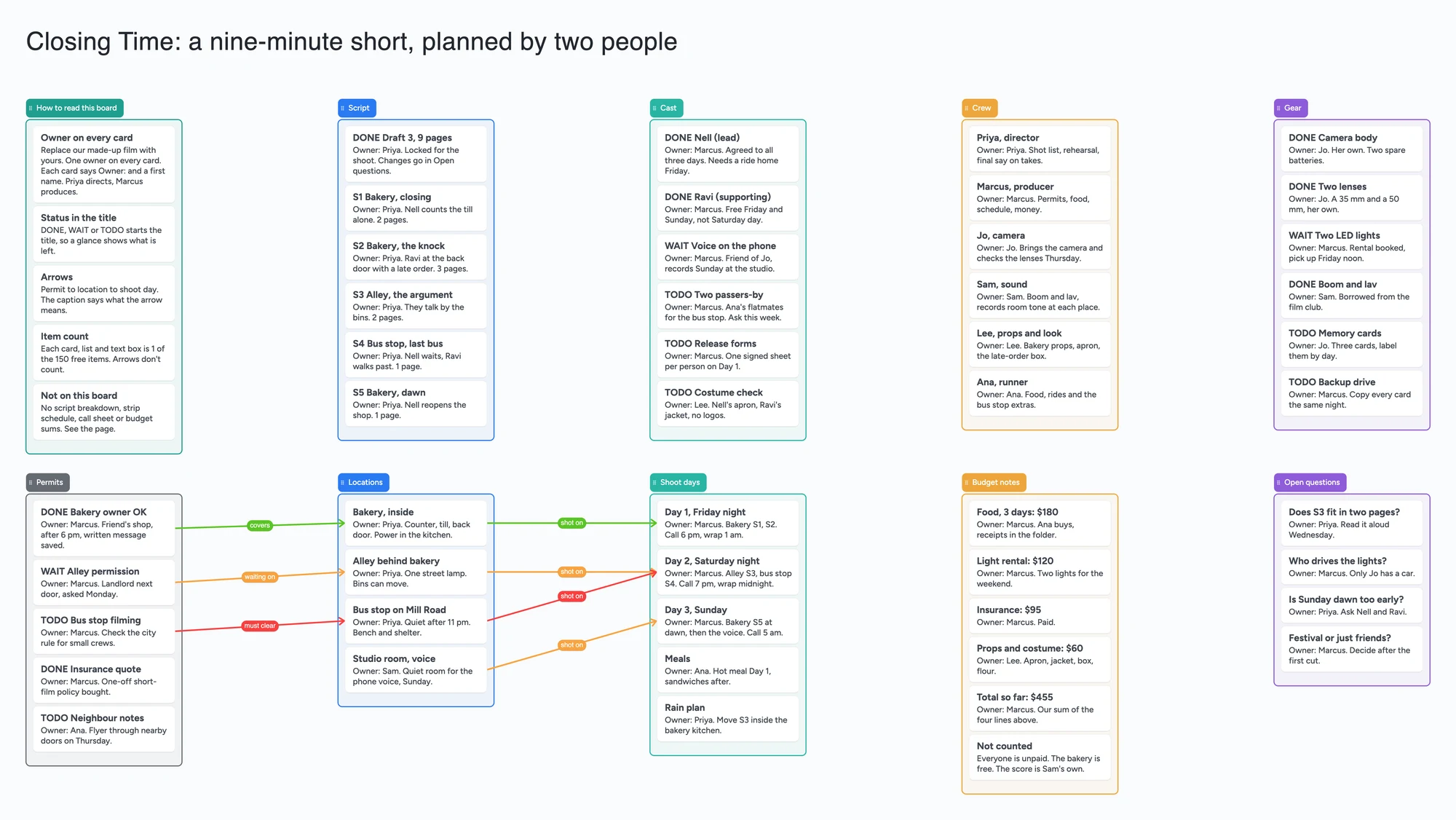
The short answer
- What it is: one board with a list for each job (script, cast, crew, gear, permits, locations, shoot days, budget notes, open questions) and a card for each thing to do. Every card says "Owner:" and a first name, and DONE, WAIT or TODO starts the title.
- What it isn't: no script breakdown, no strip schedule or day-out-of-days, no call sheets and no budget maths. The budget list is cards you add up yourself. StudioBinder, Studiovity, Yamdu and Celtx are the tools for those jobs.
- Arrows: an arrow can join a card in one list to a card in another, takes a caption and its own colour, and stays attached when a card is reordered or a list moves. The example runs permit to location to shoot day, so you can see that the alley permission is what Saturday is waiting on.
- Scouting and casting: the location scouting and casting sections below show how to compare candidates and shortlist up to three actors per role on the same board.
- Free plan: the example is 64 of your 150 free items (53 cards, 10 lists and the title text box, our count). Arrows and sections don't count. A feature film, or a second short on the same account, passes 150 (Pro is $5/mo billed yearly).
What this board doesn't do, and where StudioBinder, Studiovity, Yamdu and Celtx are better
Read on November 11, 2026 from each tool's own pages. StudioBinder's pricing page says its Free plan is "free forever" and covers "all of pre-production from scripting to call sheets", and lists script breakdowns, stripboards, call sheets, shot lists, storyboards, production calendars and task boards among its paid-plan features. Its own guide to script breakdowns describes the job: tag every cast member, prop, costume, vehicle and stunt in a scene, because the breakdown feeds the shooting schedule and the budget.
Studiovity's home page lists AI script breakdown, scheduling, call sheets, shot lists, storyboards, cast and crew management and day-out-of-days reports. Its pricing page lists a monthly plan for short-term productions with 2 team members at $20 a month, and a Black Friday sale banner was running when we read it, so check the price on the day. Yamdu's home page describes script import, breakdowns, a stripboard built by dragging scenes, day-out-of-days reports, call sheets and budgeting, and does not show a price. Celtx's pricing page lists breakdown, cast and crew, schedule, budget and call sheets as "Production Planning Tools", shown on its Team card and as an optional add-on in its feature table.
Where these tools win
If you need a script breakdown that feeds a schedule, a day-out-of-days report, call sheets sent and tracked, or a budget that adds itself up, use StudioBinder, Studiovity, Yamdu or Celtx. Use this board first, or next to them, when a small crew needs one place that shows who owns each open item and what each location is waiting on.
The eight documents, and which one this board is
Storyflow, a company that sells film planning software, published a checklist on August 30, 2026. It says a short film needs eight documents, made in this order: the one page, the script, the script breakdown, the look book, the storyboard, the shot list, the schedule and the budget, with a call sheet generated for each shoot day. It is a vendor's list, and it recommends StudioBinder as the single purchase if you buy one thing, so read it as one company's method. Here is what this board holds and what it doesn't.
| Document | On this board? | Where to do it |
|---|---|---|
| 1. One page | Not built in. A card at the top of your own copy can hold it | Any text document |
| 2. Script | Only a Script list with one card per scene and its page count, not the script itself | A screenwriting app |
| 3. Script breakdown | No | StudioBinder, Studiovity, Yamdu or Celtx (above) |
| 4. Look book | No. The free plan holds 3 images per board, so keep references as link cards | Canva or Milanote, which Storyflow's page names |
| 5. Storyboard | No. Rough the frames on [the hand-drawn storyboard board](/hand-drawn-storyboard-board) | A storyboard tool |
| 6. Shot list | No. A card per shot lives on [the shot list board](/shot-list-board) | StudioBinder, or a spreadsheet |
| 7. Schedule | Not a schedule. The Shoot days list holds each day's call time, scenes and owner as text | StudioBinder, Studiovity or a spreadsheet |
| 8. Budget | Budget notes as plain cards you add up yourself; the example's four costs come to $455 (our arithmetic) | A spreadsheet or budgeting software |
| Call sheet | No | StudioBinder, Studiovity, Yamdu or Celtx |
Swipe the table sideways to see every column.
The document list and order are Storyflow's, from its own page. The right-hand column is our reading of where each job is done, not Storyflow's table. What this board is for: who owns each open item, permits, locations and casting, between those documents.
How to plan a short film on the board
A thread of about twenty replies in r/filmmaking (February 2025) lists the order one filmmaker follows: script, boards, shot list, budget, location scouting, schedule, casting, crew, contracts. It is one person's list, not a rule. The board doesn't force that order. It gives every one of those a list. When you reach the shot list, the shot list board has a list per scene and a card per shot, and the hand-drawn storyboard board roughs the frames first.
- Start with the script list. One card per scene with its page count, as in the example (nine pages in all). Put the draft number in the first card so nobody shoots from an old one.
- Name an owner on every card. Write "Owner:" and a first name on the first line. A card with no owner is the first thing to fix. Two people can still talk about a card; one of them has to be responsible for it.
- Start each title with DONE, WAIT or TODO. Change the word when the status changes. Nothing sorts by it, so you scan for it by eye: that is the trade for a board that takes a minute to learn.
- List permits and locations separately, then join them. Draw an arrow from each permit card to the location it covers and caption it ("covers", "waiting on", "must clear"). Colour the arrows that block you red. Then draw an arrow from each location to the shoot day it is used on.
- Keep shoot days short. The example has three, each with a call time, the scenes, and an owner. A rain plan and a meals card sit in the same list.
- Put money on the board as plain cards. One line per cost with the amount, and a total card you update by hand. The example's four costs add to $455 (our arithmetic). It is a note, not a budget tool.
- Share it. In the share menu set Share to "Anyone with the link can edit" (new boards start view-only). A producer or director signs in free and writes live, and you each see the other's changes within seconds. The 4-digit join code expires after 2 hours of inactivity.
Comparing location candidates: pros, cons, permit and who tours when
The example's Locations list holds the places the film uses, one card each. While you are still choosing, give every candidate its own card in that list and write the same lines on each, so two candidates can be read side by side. In our invented film, the alley card could grow from "one street lamp, bins can move" to this (the extra lines are made up for the example):
Alley behind bakery
Owner: Priya. Pros: one street lamp, bins can move. Cons: a bar next door, so test the noise at 11 pm. Permit: waiting on the landlord. Tour: Priya and Jo, Thursday 7 pm.
- Pros and cons on their own lines. Short and the same for every candidate. StudioBinder's location scout checklist is a good list of what to look at: whether the place fits the story, what the camera will see, sound (it says to check noise sources such as refrigerators and HVAC and to "test it out before shoot day"), the surroundings on the days and times you plan to shoot, and where gear, crew parking and departments will go.
- Permit status in the title. Start with DONE, WAIT or TODO, as on every other card, and draw an arrow from the permit card to the candidate it covers, captioned "covers" or "waiting on", red when it blocks you. That is the permit-to-location arrow the example already uses.
- Who tours when, on a line of its own. "Tour: Priya and Jo, Thursday 7 pm". The board sends no reminder and has no timeline axis, so the day lives in the card's text; the shoot-day cards hold the dates that matter.
- Candidate to shoot day. Once a place wins, draw an arrow from it to the shoot day it is used on, as the example's four location arrows do. Delete the candidates you passed on, or give them a grey colour, so the list shows what is still open.
Each extra candidate is one card, so one item of your 150. This section needs no new list. The example board itself is unchanged at 64 items.
Where Storyflow and StudioBinder are better for scouting
Storyflow's location scouting page describes photos, a map and notes on power, light, sound and access for each location, laid side by side on one canvas, with a view-only link for the director and producer; it says plans start at $7.99 a month, and its pricing page says paid-only during early access. A photo-led scout fits that better: our free boards hold 3 images each, so keep the photos in your phone's album and write what they show on the card. StudioBinder's checklist page also offers a free printable location checklist PDF to carry on the tour; the board has no printable checklist.
A casting shortlist: up to three people per role
The example's Cast list holds the roles (Nell, Ravi, a voice on the phone, two passers-by) with an owner on each. For a casting round, add a second list next to it called "Casting shortlist" and put one card per candidate in it, up to three for each role.
- One card per candidate, first name only. The title starts with the role and the name: "Nell: Dana". Below it, in the same plain lines as the rest of the board: "Owner: Marcus. Audition: Saturday 3 pm. Callback: WAIT. Free: Friday and Sunday."
- Use the status word for the callback. Change the first word of the title to WAIT or DONE as the callback is offered and answered; nothing sorts by it, so you scan for it.
- Say who holds each candidate. The owner line is the person who contacts that actor, so a director and a producer don't both write to the same person.
- Draw the pick. When someone is chosen, draw an arrow from that card to the role's card in Cast, captioned "cast as", and delete the other cards or colour them grey. Give each person their own cards: if two people type in the same card at once, the edits merge.
- Keep private details off. A free board is shared by a link, so write first names and a role only. No phone numbers, emails, agent details or age, and no headshots (a free board holds 3 images). StudioBinder's guide lists a date of birth, an address, height and weight among what a casting sheet collects; none of that belongs here.
Our arithmetic: three roles with three candidates each is 9 cards, plus the new list, 10 items. With the example's 64 that is 74 of your 150 free items. Arrows don't count.
- No audition video. The board doesn't record or play auditions. Keep each recording where you already keep it and paste its link into the candidate's card.
- No actor database. It holds no profiles, headshots or résumés and nothing that sorts or filters candidates for you.
- No casting-call posting. It doesn't post a notice or collect submissions. StudioBinder's guide says casting notices go to agents and to sites like Backstage, which collect the headshots and details for you.
- No callback reminders. Nobody is told that a callback is due.
Where StudioBinder is better for casting
StudioBinder's guide to casting auditions walks through ten steps: a casting breakdown, a casting sheet, audition sides, notes, recording every audition, organising and backing up talent information, and callbacks. It offers a free casting sheet template (an email address gets you the download), and says that in StudioBinder you can move casting forms into a contact database for actors and create custom lists for "Callbacks". Use it for the sheet and the contact data; use the board to see who is on each shortlist and who owns the call.
When the director and the producer work from different places
The usual shape of a small short is two people who decide and a few who help. One thinks about the film, one about the weekend. The board is the place they meet without a meeting: the director reads the permits list and the producer reads the script list, and an open question goes in the last list instead of a message that scrolls away. Free calls on the board run up to 60 minutes per call, with a warning 10 minutes before the end. Calls need a free sign-in for everyone, aren't recorded, and Pro has no limit.
If you are still writing the film together, see outlining a story with a co-writer and outlining with index cards. If you came from Milanote's free limit, see the Milanote comparison for writers and filmmakers. While it is being cut, a post-production tracker board keeps each round of notes and each cut on the same layout. Once the film is finished, a festival strategy board is the same two-person layout for deciding where to send it.
This board vs StudioBinder vs Studiovity vs Yamdu vs Celtx vs Storyflow
| Tool | What we read (Nov 11, 2026) | Good at | Not what you get |
|---|---|---|---|
| Instaboard board | Free: 5 boards, 150 items. Pro $5/mo billed yearly | Who owns what, what a location is waiting on, a partner on the same link after a free sign-in | Script breakdown, schedule, call sheets, budget sums |
| StudioBinder | Free plan listed as "free forever"; paid plans add breakdowns, stripboards, call sheets, shot lists. Prices not quoted | A script breakdown that feeds the schedule; call sheets; shot lists | A loose board where you move things as you like |
| Studiovity | Monthly plan: 2 team members, $20/mo (a Black Friday banner was running; check the day's price) | AI script breakdown, scheduling, call sheets, budget, day-out-of-days | A free-form board |
| Yamdu | Price not shown on its home page | Stripboard, day-out-of-days, call sheets, budgeting; its page names film, TV, commercial and documentary productions | A quick sketch for two people |
| Celtx | Production Planning Tools on the Team card, optional add-on in its table; prices not read | Writing and production planning in one place | A board you open without a plan |
| Storyflow | "Paid-only during early access"; Free plan "launches before the end of 2026"; anyone invited by a paid member joins free | References and stills on a canvas, AI assistant | Free for the person who starts the board, today |
Swipe the table sideways to see every column.
From each tool's own pages, read November 11, 2026. Where a page showed a sale banner or no figure, we say so instead of quoting a settled price.
Limits of the free plan for a film
- Items. Each card and each list is 1 of your 150 free items, across all your boards. The example is 53 cards, 10 lists and the title text box, 64 in all. Arrows and sections don't count.
- A feature, or a second short, passes 150. Our arithmetic: the example is 64 for a nine-minute short, so a second film on the same account leaves about 86 items. A feature with a hundred scenes won't fit on the free plan; Pro is $5 a month billed yearly.
- Boards. The free plan includes 5 boards. A card that opens its own board uses one of them, so the example keeps everything on one board.
- Photos. 3 images per board. The example has none. Use link cards for location photos or lookbooks; a link card's preview picture no longer counts toward the 3.
- No reminders, no due-date alerts, no sorting by status. The board doesn't tell anyone that a permit is late. Card colour is the border and text only.
- No PDF of the whole board. You can copy a selection as an image to paste into a message.
- Writing needs a free sign-in. A partner who joins by link or code can add cards and arrows, and the board counts as one of their 5.
Start from the ready board
It opens in your browser in a few seconds, with nothing to install. Sign in for free when you want to save it and share it.
Questions
Is there a free short film pre-production template?
Yes. Open the board, replace the example film with yours and turn on "Anyone with the link can edit" if your producer or director needs to write on it. It is a board of cards, lists and arrows, not a breakdown or schedule template; for those, StudioBinder lists a free plan.
Can it make a call sheet or a shooting schedule?
No. It has no script breakdown, strip schedule, day-out-of-days or call sheet. Use StudioBinder, Studiovity, Yamdu or Celtx for those, and use the board for who owns what.
Can my producer and director both work on it?
A person who opens the link and signs in free can write on it live; you each see the other's changes within seconds. The board counts as one of their 5 free boards, and the cards they add count toward their own 150 items.
How many cards fit on the free plan?
Each card and each list is one item of the 150 across all your boards. The example short is 64. That is our arithmetic. Arrows are free.
Can I compare shooting locations on the board?
Yes, as text. Give each candidate a card with pros, cons, permit status and who tours when, and draw an arrow from the winner to its shoot day. It holds 3 images per free board, so it is not a photo-led scouting tool; Storyflow's location scouting page is built around photos and maps.
Can I run casting on the board?
You can keep a shortlist of up to three candidates per role with an audition date, a callback status and an owner. It doesn't record auditions, keep an actor database or post casting calls. StudioBinder has a casting guide and a free casting sheet template for that.
Does it work for a documentary or a music video?
The lists work for any small shoot, but the example and the wording are a scripted short. Swap the script list for your interview or shot list.
Sources
- StudioBinder: pricing (read November 11, 2026)
- StudioBinder: Breaking Down a Script (read November 11, 2026)
- Studiovity: home and pricing (read November 11, 2026)
- Yamdu: home (read November 11, 2026)
- Celtx: pricing (read November 11, 2026)
- Storyflow: pricing (read November 11, 2026)
- Storyflow: location scouting app (read November 11, 2026; page shows no date)
- Storyflow: The Short Film Pre-Production Checklist (published August 30, 2026; a vendor's own guide; read November 15, 2026)
- StudioBinder: Location Scout Checklist for Producers and ADs (read November 11, 2026; page shows no date)
- StudioBinder: Ultimate Guide to Casting Auditions (read November 11, 2026; page shows no date)
- r/filmmaking: pre-production thread (February 2025, replies are single accounts)
Related
Outline a novel or screenplay with index cards, on a board you can share
Outline a novel or screenplay on digital index cards: one list per act, 40 short cards, subplot arrows, a co-writer on the same board. Free to start; TV pilot too.
Outline a story with a co-writer, on one board you both edit
Outline a story with a co-writer on one shared board: ideas lists for each of you, an agreed outline, a decide-by list. A filled example to copy. Not a drafting tool.
A free Milanote alternative for student projects, and where Milanote is better
Milanote's free plan stops at 100 notes, images or links. What Instaboard's free plan gives a student project, where Milanote is better, and a ready project board.